Introduction
Loci is a spaced-repetition app for Linux, Windows, macOS, Android and the browser. It imports Anki collections with their review history, schedules with FSRS-6 or SM-2, and exports back to .apkg. Downloads are on the project page; the source is at github.com/ZahakJ/loci-rs.
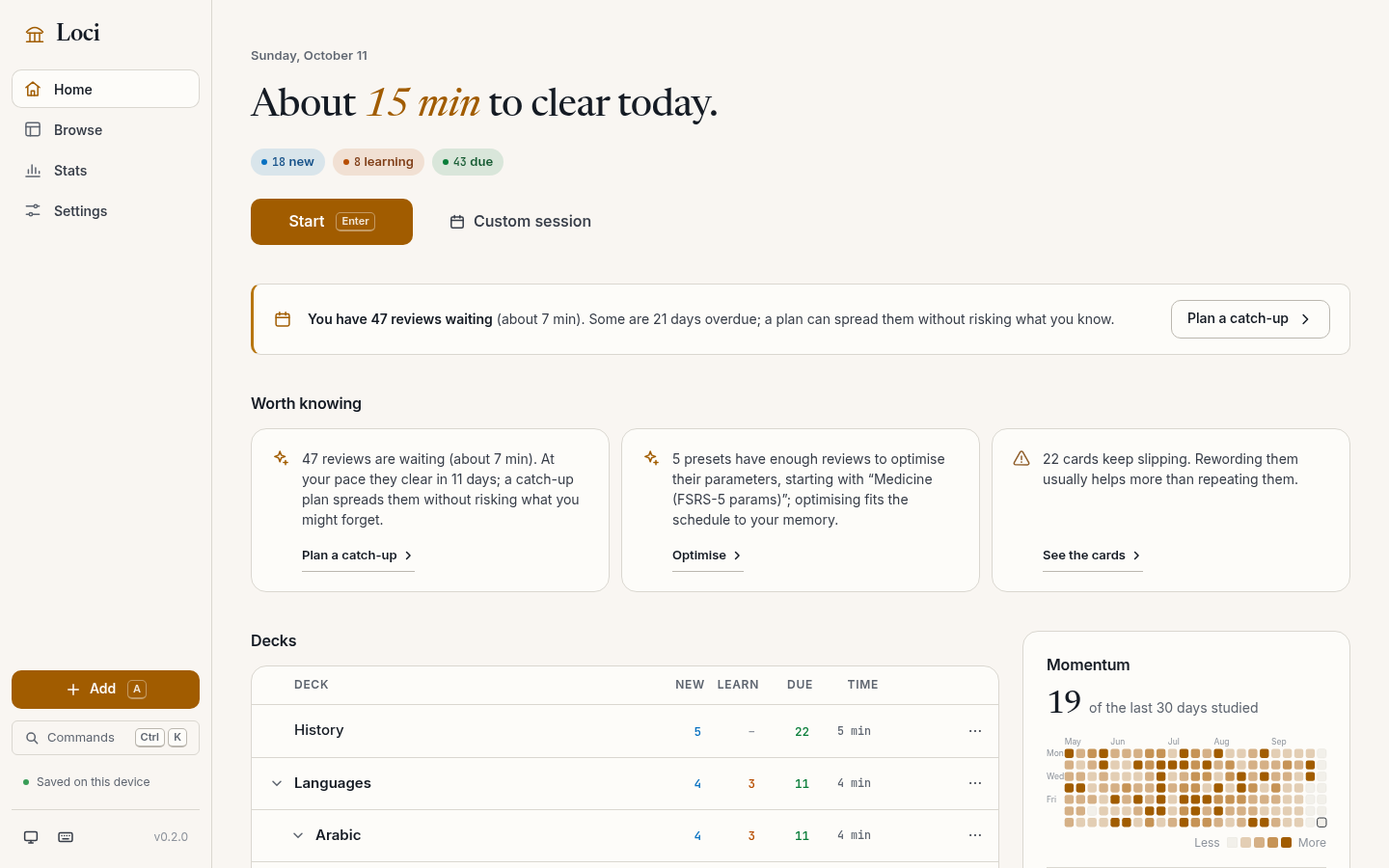
Features
- Anki import and export.
.apkgand.colpkgin every package layout: notes, note types, templates, media, tags, decks, review history and scheduling state. Due dates carry over. Exports.apkgfor Anki 2.1 through 26.x and AnkiDroid. - FSRS-6. 21 parameters, fitted per preset to your reviews by the optimiser. SM-2 per preset. See FSRS-6.
- Workload. A daily time budget instead of card caps, catch-up for backlogs, a 90-day forecast before changing new cards per day or desired retention, and days studied in the last 30 instead of streaks.
- Storage. One SQLite file in the app-data directory, rotating automatic backups, an integrity check on open, and a full-backup zip. No account.
- Sync. Through a shared folder or a sync file; no server. See Sync.
- Cards. Light and dark themes; Arabic, maths (KaTeX) and code render in cards.
Chapters
- Using Loci: Getting started, Loci in the browser, Sync, Import, export and backups, Search syntax.
- Scheduling: FSRS-6.
- Scripting: The CLI.
- Code: Architecture, The data model.
MIT licence.
Getting started
Install
Every build is on the latest release. The lines below are for v0.2.1.
Linux. AppImage below; Loci_0.2.1_amd64.deb and Loci-0.2.1-1.x86_64.rpm are on the release page.
curl -LO https://github.com/ZahakJ/loci-rs/releases/download/v0.2.1/Loci_0.2.1_amd64.AppImage && chmod +x Loci_0.2.1_amd64.AppImage && ./Loci_0.2.1_amd64.AppImage
Windows. PowerShell, .msi installer (or Loci_0.2.1_x64-setup.exe):
Invoke-WebRequest https://github.com/ZahakJ/loci-rs/releases/download/v0.2.1/Loci_0.2.1_x64_en-US.msi -OutFile Loci.msi; Start-Process .\Loci.msi
macOS. Apple silicon; for Intel replace aarch64 with x64.
curl -LO https://github.com/ZahakJ/loci-rs/releases/download/v0.2.1/Loci_0.2.1_aarch64.dmg && open Loci_0.2.1_aarch64.dmg
The build is not notarised, so the first launch says “Apple could not verify Loci”. Right-click Loci in Applications and choose Open, then Open again; on macOS 15 and later, open it once, then click Open Anyway in System Settings → Privacy & Security. Or:
xattr -cr /Applications/Loci.app
(details)
Android 7.0+. The arm64 APK over adb; loci-v0.2.1-android-universal.apk covers every ABI:
curl -LO https://github.com/ZahakJ/loci-rs/releases/download/v0.2.1/loci-v0.2.1-android-arm64.apk && adb install loci-v0.2.1-android-arm64.apk
Or open the APK link on the phone.
From source. Rust (pinned in rust-toolchain.toml), Node and pnpm; on Linux, the WebKitGTK libraries Tauri needs.
git clone https://github.com/ZahakJ/loci-rs && cd loci-rs/apps/loci && pnpm install && pnpm tauri build
The first-run screen
An empty collection opens on three choices:
- Import from Anki. A drop zone for an
.apkgor.colpkg. - Try a sample deck. Thirty bundled cards, with cloze, image, maths and Arabic cards.
- Start empty. Name a first deck and add cards as you go.
Bringing your Anki collection over
In Anki, use File › Export and choose either Anki Collection Package (.colpkg), which is the whole collection, or Anki Deck Package (.apkg) for one deck. Drop the file on Loci’s import screen (or on the first-run drop zone).
Loci reads the whole package and shows a preview (notes, cards, decks, reviews, media, cards with FSRS state) before writing anything. Then:
- Destination. Add to my collection merges by Anki’s note ID, so importing the same deck twice does not duplicate it. Replace my collection swaps the whole collection; the current one is backed up first.
- When a note already exists. Newest edit wins (recommended), Keep mine, or Use the imported version.
- Keep scheduling. On by default. Off imports the cards as new.
With scheduling kept:
- Due dates. Shifted by the difference between the two collections’ creation days, so each card falls due on the same calendar day as in Anki.
- Review history. Every review-log row of the imported cards.
- FSRS state. Stability and difficulty are kept verbatim.
- Media. Every file in the package, with Anki’s filename normalisation.
Cards in an Anki filtered deck return to their home deck; Custom session covers the same uses. If any part of the package cannot be read, nothing is imported and the error says why. Full rules: Import, export and backups.
Studying
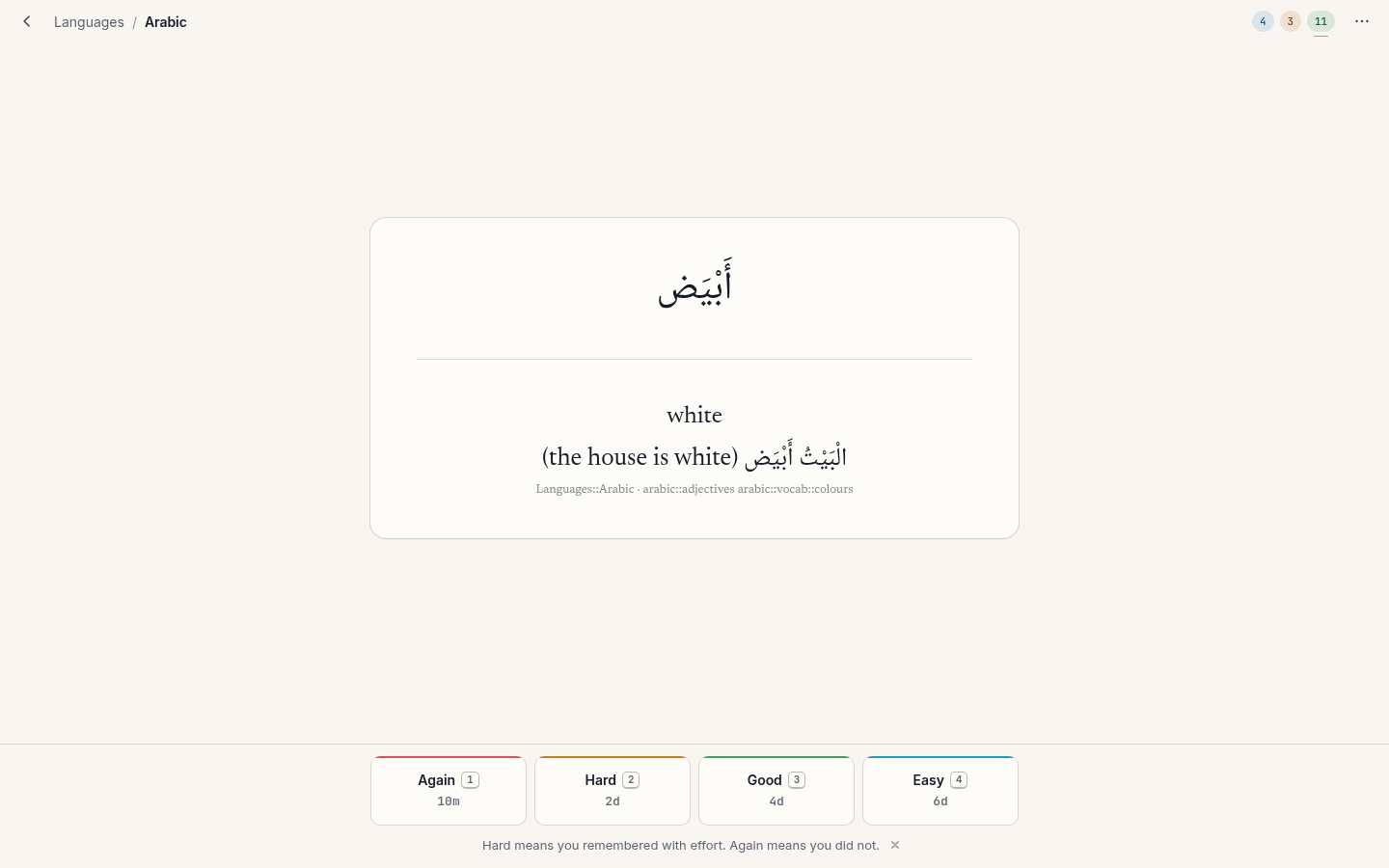
Choose a deck on Home and press Start. Space or enter (or Show answer) reveals the back. Then:
| Key | Button | Meaning |
|---|---|---|
1 | Again | You did not remember. |
2 | Hard | You remembered, with effort. |
3 | Good | You remembered. Space and enter also mean Good. |
4 | Easy | You remembered without effort. |
Each button shows the interval it would give. Hard is a pass; if you did not remember, press Again.
The other study keys:
| Key | Action |
|---|---|
z, u or ctrl+z | Undo the last answer |
e or o | Edit this note |
s or @ | Suspend the card |
! | Suspend the note (all its cards) |
b or - | Bury the card until tomorrow |
= | Bury the note until tomorrow |
f | Toggle the flag |
ctrl+1 … ctrl+7 | Set a flag colour |
m or * | Mark the note (adds the tag marked) |
ctrl+shift+d | Set the due date |
ctrl+delete | Delete the note |
i | Why this interval? |
r | Replay audio |
t | Focus the typed-answer box |
? | Show every shortcut |
esc | Leave the session |
Why this interval? i shows retrievability now, stability (days until recall falls to 90%), difficulty (1 to 10), due date and interval, reviews, lapses and history. See FSRS-6.
A session ends with a summary: cards, minutes, accuracy, tomorrow’s estimate, and an insight if there is one.
Adding notes
a outside a study session opens the Add sheet. Note type and deck remember the last choice; ctrl+enter adds and returns to the first field. Sticky fields keep their value; a duplicate first field is flagged. On desktop a live preview sits under the fields.
The built-in note types are Basic, Basic (and reversed card), Basic (type in the answer), Cloze and Image Occlusion; imported Anki note types work as they did in Anki.
Cloze. Select text and press ctrl+shift+c to wrap it in the next cloze number, or ctrl+alt+shift+c to reuse the current number (two gaps on the same card). Nested and overlapping clozes work as in Anki.
Image occlusion. Paste or choose an image, then draw rectangles, ellipses or polygons over the parts to hide, and choose Hide all, guess one or Hide one, guess one. Shapes are stored in Anki’s image-occlusion format.
Other editor keys: ctrl+shift+x toggles the HTML source and ctrl+m inserts maths.
Where your data lives
The platform app-data directory:
| Platform | Directory |
|---|---|
| Linux | ~/.local/share/space.avicenna.loci |
| Windows | %APPDATA%\space.avicenna.loci |
| macOS | ~/Library/Application Support/space.avicenna.loci |
| Android | the app’s internal storage |
It holds collection.sqlite, media/ and backups/ (12 daily, 10 weekly, 9 monthly). Copying the directory copies everything.
Loci in the browser
Loci runs in a web browser at zahakj.github.io/loci-rs/app: the same app and engine as the desktop and Android builds, compiled to WebAssembly. Nothing is sent to a server.
Install it
Open the address in Chrome, Edge, Safari or Firefox. To keep it like an app, with its own window and icon:
- Chrome and Edge: the install icon at the right of the address bar, or the menu › Install Loci.
- Safari on iPhone and iPad: Share › Add to Home Screen.
- Safari on a Mac: File › Add to Dock.
- Chrome on Android: the menu › Add to Home screen.
Where your data lives
Your collection, media and automatic backups are stored inside this browser, for this site only. Another browser, another device or a private window starts with an empty collection.
To keep it in step with other devices, use sync. To move it, use Settings › Backups › Download full backup and import that file in Replace mode on the other side; full backups move freely between the browser, desktop and Android builds.
Clearing this site’s data deletes the collection. Keep a recent full backup outside the browser.
Loci is open in one tab at a time. A second tab says Loci is open in another tab; close one of them and reload.
Offline
After the first visit Loci works without a connection. A new version loads in the background on a visit online and takes effect on the next one.
The data model and Anki compatibility
The collection is one SQLite file, collection.sqlite, with Anki’s column names and units: a review Anki stored as “interval 14, ease 2500, due on day 812” is stored as those numbers. The schema is crates/loci-core/src/schema.sql.
Units
| Column | Unit |
|---|---|
notes.id, cards.id, revlog.id | milliseconds since the Unix epoch (the creation or review time) |
mtime | seconds since the epoch |
cards.due | depends on the queue: a position for new cards, epoch seconds for intraday learning, a day number counted from the collection’s creation day for review and day-learning cards |
cards.ivl | days (negative values are seconds, for learning cards) |
cards.factor | SM-2 ease in permille (2500 means 2.5) |
revlog.time | milliseconds spent answering |
revlog.ivl, revlog.last_ivl | days (negative = seconds) |
The collection’s creation day, crt, is the zero point for review due days. It lives in col_meta, together with the day rollover hour (4 by default), the schema version and a collection id.
The main tables
notes   (id ms, guid, ntid, mtime s, usn, tags, flds 0x1f-separated, sfld, csum, plain)
cards   (id ms, nid, did, ord, mtime, usn, type, queue, due, ivl, factor, reps, lapses,
         left, odue, odid, flags, data JSON)
revlog  (id ms, cid, usn, ease, ivl, last_ivl, factor, time ms, type)
- Notes hold the fields, joined by the unit separator U+001F as Anki does, and tags as a space-padded string (
' tag1 tag2 ').sfldis the HTML-stripped sort field;csumis the first 8 hex digits of the SHA-1 of the stripped first field, used for duplicate checks;plainis all fields stripped of HTML, which feeds full-text search. - Cards carry the scheduling columns.
typeis 0 new, 1 learning, 2 review, 3 relearning.queueadds the states a card can be parked in: −1 suspended, −2 buried as a sibling, −3 buried by hand, plus 3 for day-learning and 4 for preview. The low three bits offlagsare the flag colour. - Revlog has one row per answer.
easeis the button (1 Again to 4 Easy; 0 for a manual reschedule), andtypeis 0 learn, 1 review, 2 relearn, 3 filtered/early, 4 manual, 5 rescheduled.
Note types, fields, templates, decks and deck presets are normalised tables (notetypes, fields, templates, decks, deck_configs) with typed JSON configuration. Media bodies are plain files in the media/ directory, indexed by a media(name, sha1, size, mtime) table.
Other tables: tags, saved_searches, undo_log (one row per undoable step, holding the inverse operation), optimise_log (every optimiser run, with parameters and metrics before and after), and graves (deleted ids, as Anki keeps them).
Search uses an FTS5 table, notes_fts, over notes.plain and the tags, with the trigram tokenizer. Trigrams give substring matching for Latin, Arabic and CJK text; queries shorter than three characters fall back to LIKE on notes.plain.
Sync. Sync stamps and deletions live in side tables (sync_rows and its neighbours); the Anki-compatible tables are untouched.
FSRS state lives where Anki puts it
FSRS memory state is stored in cards.data as JSON, with Anki’s keys: s (stability in days), d (difficulty, 1 to 10), dr (desired retention in effect), decay, and pos (the original new-card position). A card that goes Loci → Anki → Loci keeps both its FSRS state and its SM-2 columns.
Package layouts
Anki has three package layouts. A zip entry called meta (a small protobuf) says which one a file uses; when it is absent, the name of the collection file inside decides.
| Layout | Collection file | Schema | Compression | Media map |
|---|---|---|---|---|
LEGACY_1 (no meta) | collection.anki2 | 11 | zip deflate | JSON |
LEGACY_2 (meta = 08 02, or absent with collection.anki21) | collection.anki21 | 11 | zip deflate | JSON |
LATEST (meta = 08 03) | collection.anki21b | 18 | zstd | zstd-compressed protobuf |
Loci reads all three, as .apkg (a deck) or .colpkg (a whole collection). zstd is decoded in pure Rust; protobuf fields are decoded by field number.
Loci writes one: LEGACY_2. An export is a schema-11 collection.anki21, meta = 08 02, a JSON media map with numbered media files, "schedVer": 2 in the collection config, and the small dummy collection.anki2 that every Anki package carries for very old clients. Anki 2.1 through 26.x and AnkiDroid import this layout. Loci never writes .anki21b.
What round-trips
Exporting from Loci and importing the result into a second Loci collection is lossless: notes, every scheduling column of every card, FSRS data, the review log and media bytes come back identical. The test suite checks this.
Out to Anki and back:
- The day numbering. If the collection began with an import from Anki, exports carry that Anki collection’s creation time (
crt) and renumber due days to it, so a package returning to Anki has the day numbering it left with. Otherwise the package carries Loci’s owncrt. Either way the day numbers andcrtagree, so any importer lands each card on the same date. - Deck presets are written as Anki deck options. A preset that came from Anki keeps its original Anki JSON, so options Loci does not model are not lost.
What does not round-trip:
- Filtered decks. Loci has no persistent filtered decks. Importing one returns its cards to their home decks. Use Custom session for study-ahead, forgotten cards, previews or an arbitrary search.
- The
.anki21blayout. A collection imported from aLATESTpackage exports asLEGACY_2, with the same content.
FSRS-6
FSRS (the Free Spaced Repetition Scheduler) schedules each card just before you would forget it, using a small memory model fitted to your reviews. Loci uses FSRS-6, the version Anki ships, ported from fsrs-rs v6.6.2 and checked against its test vectors.
Three numbers per card
FSRS describes the memory of each card with three numbers.
Retrievability, R. The probability that you would recall the card if you saw it right now. It is 1 just after a successful review and falls as time passes. A card with R = 0.9 is one you would answer correctly nine times in ten.
Stability, S. How slowly R falls, measured in days. Precisely: S is the number of days it takes for R to fall from 1 to 0.9. A card with S = 30 is one you would still recall with 90% probability a month after the last review. Stability is what reviews build.
Difficulty, D. A number from 1 to 10 for how hard this card is for you. It does not set the interval directly; it sets how much each successful review raises stability.
Press i while studying to see all three.
The forgetting curve
How does R fall with time? FSRS-6 models it with a power law that drops quickly at first and then flattens, shaped by one tunable parameter, the decay w20:
FACTOR = 0.9^(-1/w20) - 1
R(t, S) = (1 + FACTOR · t / S)^(-w20)
Here t is the number of days since the last review. FACTOR makes R(S, S) = 0.9 for any decay. With the default decay w20 = 0.1542, FACTOR = 0.98035.
FSRS-4.5 and FSRS-5 fixed the decay at 0.5; FSRS-6 fits it to your reviews like every other parameter.
From desired retention to the next interval
You choose a desired retention, DR: the probability of recall you want at the moment a card comes due. The default is 0.90. The next interval is the time at which R falls to DR, which is the forgetting curve solved for t:
I(DR, S) = S / FACTOR · (DR^(-1/w20) - 1)
At DR = 0.9 this is exactly S: a card with stability 14 days is due in 14 days. Loci rounds the result to whole days and applies a small random spread (the fuzz, described below).
The first review
A new card has no memory yet. The first answer, G (1 Again, 2 Hard, 3 Good, 4 Easy), sets the initial state:
S0(G) = w[G-1]                              Again → w0, Hard → w1, Good → w2, Easy → w3
D0(G) = w4 - exp(w5 · (G - 1)) + 1          clamped to [1, 10]
The first four parameters are the initial stabilities, in days, for each button.
After a successful review
When you pass a review (Hard, Good or Easy) after t > 0 days, stability grows:
S' = S · ( exp(w8) · (11 - D) · S^(-w9) · (exp(w10 · (1 - R)) - 1) · hard · easy + 1 )
       hard = w15 if G = 2, else 1
       easy = w16 if G = 4, else 1
11 - D: easier cards (low D) grow more.S^(-w9): the more stable a memory already is, the smaller its relative growth.exp(w10 · (1 - R)) - 1: the lower R was at the review, the larger the gain.hardandeasy: Hard is a pass with a penalty and Easy a pass with a bonus (by defaultw15= 0.6014 andw16= 1.8729).
R is the retrievability at the review and D the difficulty before it.
After a lapse
When you press Again after t > 0 days, the memory has failed and stability drops:
S'_f = w11 · D^(-w12) · ((S + 1)^w13 - 1) · exp(w14 · (1 - R))
S'   = min(S'_f, S / exp(w17 · w18))
A forgotten card does not start from zero: the new stability still grows with the old one through (S + 1)^w13, so a long-held memory keeps more after a lapse than a young one. The second term caps the result, so relearning steps on the same day cannot push stability back above its value before the lapse.
Reviews on the same day
When t = 0 (a learning step, or a second look on the same day), FSRS-6 uses a separate short-term rule for all four buttons:
SInc = exp(w17 · (G - 3 + w18)) · S^(-w19)
S'   = S · max(SInc, 1)      for Hard, Good, Easy
S'   = S · SInc              for Again
A pass on the same day never lowers stability.
How difficulty moves
Every rated review, same-day ones included, updates difficulty in two steps:
D'  = D - w6 · (G - 3) · (10 - D) / 9          linear damping
D'' = w7 · D0(4) + (1 - w7) · D'                mean reversion
D_new = clamp(D'', 1, 10)
Again and Hard raise D, Easy lowers it, Good leaves the first step unchanged. The factor (10 - D) / 9 damps the change near 10. Mean reversion pulls D slightly toward D0(4), the initial difficulty of an Easy card, so one bad start does not stick.
The default parameters
These are the 21 FSRS-6 defaults, as defined in crates/loci-core/src/collection/presets.rs (identical to fsrs-rs v6.6.2):
| Parameters | Default values | Where they appear |
|---|---|---|
| w0, w1, w2, w3 | 0.212, 1.2931, 2.3065, 8.2956 | initial stability for Again, Hard, Good, Easy |
| w4, w5 | 6.4133, 0.8334 | initial difficulty |
| w6 | 3.0194 | how far one answer moves difficulty |
| w7 | 0.001 | mean reversion of difficulty |
| w8, w9, w10 | 1.8722, 0.1666, 0.796 | stability growth after a pass |
| w11, w12, w13, w14 | 1.4835, 0.0614, 0.2629, 1.6483 | stability after a lapse |
| w15 | 0.6014 | Hard penalty |
| w16 | 1.8729 | Easy bonus |
| w17, w18, w19 | 0.5425, 0.0912, 0.0658 | same-day reviews (w17 and w18 also cap stability after a lapse) |
| w20 | 0.1542 | decay of the forgetting curve |
Stability is clamped to [0.001, 36500] days and difficulty to [1, 10]. Older 17- and 19-parameter vectors (FSRS-4.5 and FSRS-5) are converted and padded to 21 when they are loaded, as fsrs-rs does.
A worked example
Follow one card through two reviews at DR = 0.90. The numbers were computed from the formulas above with the default parameters, in double precision, and rounded for display.
The example uses a preset with no learning steps, so the first answer graduates the card at once. (With the Standard preset’s 1m and 10m steps, the first day adds a same-day Good: its SInc of 0.9945 is floored to 1, so S stays 2.3065, and mean reversion moves D to 2.1112.)
Day 0: the first answer is Good
The card is new, so the initial-state formulas apply with G = 3:
S = w2 = 2.3065 days
D = w4 - exp(w5 · 2) + 1 = 6.4133 - exp(1.6668) + 1 = 6.4133 - 5.2952 + 1 = 2.1181
The interval at DR = 0.9 equals stability, 2.3065 days, which rounds to 2 days. Intervals below 2.5 days get no fuzz.
Day 3: the second answer is Good
You come back three days later, one day after the card fell due. First, how likely were you to remember it?
FACTOR · t / S = 0.98035 · 3 / 2.3065 = 1.27511
R = (1 + 1.27511)^(-0.1542) = 0.8809
An 88% chance, below the 90% target because the review is a day late. You answer Good:
exp(w8)                  = exp(1.8722)              = 6.5026
11 - D                   = 11 - 2.1181              = 8.8819
S^(-w9)                  = 2.3065^(-0.1666)         = 0.8700
exp(w10 · (1 - R)) - 1   = exp(0.796 · 0.1191) - 1  = 0.0994

product = 6.5026 · 8.8819 · 0.8700 · 0.0994 = 4.9948
S' = 2.3065 · (4.9948 + 1) = 13.8269 days
Stability grew about sixfold. Difficulty barely moves: Good leaves the damping step unchanged and the mean-reversion weight w7 is only 0.001:
D'  = 2.1181                                         (G = 3: no change)
D'' = 0.001 · D0(4) + 0.999 · 2.1181
    = 0.001 · (-4.7716) + 0.999 · 2.1181 = 2.1112
D0(4) is the initial difficulty of an Easy card before clamping, 6.4133 − exp(0.8334 · 3) + 1 = −4.7716.
The next interval at DR = 0.9 is S’ itself: 13.83 days, which rounds to 14 days. The fuzz window for an interval of 13.83 days is ±2.36 days, so before Anki’s rule that keeps the four buttons in order, the card lands somewhere from day 11 to day 16 after this review.
What the other buttons would have given
At the same review (t = 3, R = 0.8809), the four buttons lead to these states:
| Button | New S (days) | New D | Unrounded interval |
|---|---|---|---|
| Again | 0.6369 | 7.3945 | 0.64 |
| Hard | 9.2349 | 4.7529 | 9.23 |
| Good | 13.8269 | 2.1112 | 13.83 |
| Easy | 23.8831 | 1.0 | 23.88 |
Again uses the lapse formula: the long-term term gives 0.6369, well under the cap of 2.3065 / exp(0.5425 · 0.0912) = 2.1952. On a review card, Again then moves the card to the Standard preset’s 10-minute relearning step. Easy pushes difficulty below 1, and the clamp holds it at 1.
Desired retention and workload
Because the interval formula is linear in S, desired retention changes every interval by the same factor. With the default decay, the interval is this multiple of stability:
| Desired retention | Interval as a multiple of S | For the example card (S = 13.83) |
|---|---|---|
| 0.80 | 3.32 | 45.8 days |
| 0.85 | 1.91 | 26.4 days |
| 0.90 | 1.00 | 13.8 days |
| 0.93 | 0.61 | 8.5 days |
| 0.95 | 0.40 | 5.6 days |
| 0.97 | 0.22 | 3.1 days |
Going from 0.90 to 0.95 shortens every interval to 40% of its length: roughly two and a half times as many reviews of a mature card, to forget half as often (5% of due cards instead of 10%). Going down to 0.85 nearly doubles the intervals. Loci’s presets sit at 0.85 (Relaxed), 0.90 (Standard) and 0.93 (Intense), and the setting accepts values from 0.70 to 0.99.
Before you change desired retention or new cards per day, Loci shows a workload forecast: a 90-day sparkline of predicted reviews per day, simulated on your actual cards.
What the optimiser does
The optimiser (fsrs-rs v6.6.2, as Anki calls it) fits the 21 parameters to your history, per preset:
- Items. Each card’s review log becomes training items: answers and the days between them, with the last answer as the outcome to predict.
- Outlier filter. Cards are grouped by their first answer and first interval. The smallest groups are dropped until at least 20 items or 5%, whichever is more, are gone, and so is any group under 6 cards or with a first interval over 100 days (365 after Easy).
- Thresholds. With fewer than 8 training items, the defaults stay. With fewer than 64, or when no card has a second long-term review, only the initial stabilities w0 to w3 are fitted (pretraining). Otherwise the full fit runs.
- The fit. Adam on the log-loss: the model predicts R at each item’s last review, and the loss measures how far those predictions are from what happened. Eight epochs, batches of 512, learning rate 0.04 with cosine annealing, recent reviews weighted more, an L2 prior toward the starting values, and parameters clipped to their ranges after every step.
- Acceptance. The new parameters are kept only if their log-loss on your reviews is lower than the current ones’. Each run records log-loss and RMSE(bins) before and after in the collection’s
optimise_log.
Optimise and Evaluate sit in each preset’s settings, next to the parameters and the last run’s metrics. An Optimise that adopted new parameters can be undone: the preset’s previous parameters and every refreshed memory state come back.
Each preset has an auto-optimise switch (on, threshold 400 reviews). The engine’s maintenance pass optimises the FSRS preset with the most new reviews since its last run, if that is at least 400; automatic runs are not undoable. The app does not run maintenance by itself: use Optimise in the preset’s settings.
The fuzz
Fuzz spreads cards learned together with a small random offset, by Anki’s rule:
| Part of the interval | Spread added |
|---|---|
| below 2.5 days | none |
| 2.5 to 7 days | 15% |
| 7 to 20 days | 10% |
| beyond 20 days | 5% |
The window’s half-width is 1 day plus those percentages of each part of the interval. The day inside it comes from Anki’s own generator, StdRng::seed_from_u64(card.id + reps) (ChaCha12), so a card gets the same day as in Anki.
SM-2
Each preset has a scheduler switch. SM-2 behaves as in Anki’s v3 scheduler.
Import, export and backups
Every path that moves data in or out reads everything first, writes in one transaction, and keeps a copy before anything is replaced.
Import
Loci imports Anki .apkg (decks) and .colpkg (a whole collection) in any package layout, and its own full-backup .zip.
Two destinations:
- Merge (Add to my collection) adds the package to what you have. Notes are matched by their Anki
guid. A note that is new is added; a note you already have is updated or skipped according to the conflict rule, which by default is newest edit wins: the incoming note replaces yours only if its modification time is newer. The other rules are Keep mine and Use the imported version. Importing the same deck twice does not duplicate it. - Replace (Replace my collection) swaps the whole collection for the package. The current collection is saved as a
pre-restorebackup first.
All or nothing. The whole package is read and validated before anything is written. If any part cannot be read (a truncated zip, a damaged database, a media file whose checksum does not match, a package from a newer Anki than Loci understands), the import stops with an error that says why, and the collection is untouched. The write itself is one transaction: media files first, then notes, cards and review history together.
What the merge does with scheduling. Review due days are shifted by the difference between the two collections’ creation days, so every card falls due on the same calendar day. FSRS state in cards.data is kept verbatim. Review-log rows of imported cards are added. Cards in filtered decks go back to their home decks. Media keep Anki’s names; a name already taken by a different file gets Anki’s -<sha1> suffix and the imported notes are rewritten to match. With Keep scheduling off, imported cards start as new, as with Anki’s “without scheduling” export.
Undo. An import of up to 20,000 rows is one undo entry. A larger import into a non-empty collection writes a pre-restore backup instead.
Export
Export writes an Anki package of one deck (with its subdecks) or of the whole collection, with or without scheduling and with or without media. The file is the legacy .apkg layout that Anki 2.1 through 26.x, AnkiDroid and AnkiMobile import; see package layouts. Without scheduling, cards go out as new.
Download full backup writes Loci’s own .zip (below); .apkg is for Anki.
Automatic backups
A backup is collection.sqlite serialised from the open database, written under a temporary name and renamed. Backups live in backups/ inside the data directory, named by their UTC time and kind:
loci-20261011-041106-auto.sqlite
loci-20261011-093000-manual.sqlite
loci-20261011-101500-pre-restore.sqlite
When they run.
- On leaving the app (window closed or interface hidden), if anything changed since the last backup.
- Back up now (a
manualbackup). - Before anything destructive: restoring a backup, Reset collection, an import in Replace mode, restoring a full backup, and a large import into a non-empty collection all write a
pre-restorebackup first.
The engine’s autoBackup method (also part of maintenance) backs up when something changed and the last backup is at least 30 minutes old; the app does not call it by itself.
Rotation. Loci keeps every automatic backup from today, then the newest of each previous day up to 12 days, then one per week for 10 more weeks, then one per month for 9 more months: 12 daily, 10 weekly and 9 monthly. Manual and pre-restore backups are never deleted automatically.
Restore
Settings › Backups lists every backup, newest first, with its date, kind, size and card count. Restoring one first verifies it with PRAGMA quick_check; a damaged backup is refused and nothing changes. A healthy one replaces the collection, after the current collection has been saved as a pre-restore backup, so a restore can be undone. Media files are kept; a restore deletes none of them.
Restore from a file takes a full-backup .zip, and works the same way.
The integrity check
Opening runs PRAGMA integrity_check and reports problems. Settings › Check integrity (or loci integrity) goes further: it verifies the full-text index and the collection’s consistency, and repairs what is safe to repair. It rebuilds indexes and the search index, recreates the Default deck and preset and any missing parent decks, removes cards whose note or template is gone, moves cards from deleted decks to Default, pads notes with missing fields, generates cards for notes that have none, re-registers tags, and fixes the new-card position counter. It never deletes notes.
The Loci full-backup format
A full backup is an ordinary zip archive. backup::export_full_backup in crates/loci-core/src/backup/backup.rs writes these entries:
collection.sqlite      the database, serialised from the open collection (deflated)
media/<name>           every media file, one entry each, under its own name
manifest.json          what this file is (deflated)
Media files whose content is already compressed (images such as .png, .jpg, .webp; audio and video such as .mp3, .ogg, .mp4; archives, fonts and PDFs) are stored without deflate; everything else is deflated. Only files directly inside media/ are included.
manifest.json is pretty-printed JSON with eight keys:
| Key | Value |
|---|---|
format | always "loci-backup" |
version | 1, the version of this zip format |
schemaVersion | the collection schema version (currently 1) |
collectionId | the collection’s id from col_meta |
createdAt | when the backup was made, in Unix seconds |
notes | number of notes |
cards | number of cards |
media | number of media files |
Its shape, with placeholders for the values:
{
  "format": "loci-backup",
  "version": 1,
  "schemaVersion": 1,
  "collectionId": "<collection id>",
  "createdAt": <unix seconds>,
  "notes": <count>,
  "cards": <count>,
  "media": <count>
}
Reading it back (collection/full_backup.rs). A file is treated as a Loci full backup when it is a zip that contains both manifest.json and collection.sqlite and the manifest’s format is "loci-backup"; anything else is handed to the Anki package reader. Before anything is replaced, the database image must start with the SQLite header, pass PRAGMA quick_check, and contain a schema_version in col_meta; otherwise the file is refused as corrupt. Media entry names must already be in Anki’s normalised form and contain no further /. A full backup can only replace a collection, never merge into one. On restore, media files that are missing or differ (by size and SHA-1) are written; identical ones are left alone.
The data-safety document
docs/DATA-SAFETY.md, included as it stands:
How Loci protects a collection, what to do when something goes wrong, and the tests behind each guarantee.
Where the data lives
The platform app-data directory (app-internal storage on Android) holds collection.sqlite,
media/ and backups/. The CLI uses the same layout under --dir. There is no server.
The browser build keeps collection.sqlite and blobs.sqlite (media and backups as rows) in the
site’s origin-private file system. It holds the Web Lock loci-rs-collection, so only one tab
opens the collection, and asks the browser to keep its data (navigator.storage.persist()) on
the first write. Clearing the site’s data deletes the collection: keep a full backup elsewhere.
Guarantees
Every change is one transaction
Each write goes through Db::transaction (BEGIN IMMEDIATE … COMMIT, rolled back on any error;
nested calls join the outer transaction). An operation’s undo entry is written in the same
transaction. The journal mode is DELETE: after a crash mid-write SQLite rolls the incomplete
transaction back on the next open.
Imports read and validate the whole package before writing; media files go first, then notes, cards and review history in one transaction.
Integrity check on open
Opening runs PRAGMA integrity_check and reports problems instead of continuing silently.
Check database also verifies the full-text index and repairs what is safe to repair: rebuilds
indexes and the search index, recreates the Default deck and preset and missing parent decks,
removes cards whose note or template is gone, moves cards from deleted decks to Default, pads
notes with missing fields, generates cards for notes without any, re-registers tags and fixes the
new-card position counter. It never deletes notes.
Automatic backups
- When: on closing the window or hiding the app, if anything changed since the last backup.
The engine’s
autoBackupapplies a 30-minute rule for callers that want periodic backups. - How: the database is serialised and written to a temporary file, then renamed.
- Rotation: every automatic backup from today, then the newest of each previous day up to 12
days, one per week for 10 more weeks, one per month for 9 more months. Manual and
pre-restorebackups are never deleted automatically. - Before anything destructive (restoring a backup, Reset collection, a Replace import,
restoring a full backup, an import of more than 20,000 rows into a non-empty collection): a
pre-restorebackup.
Undo
The last 50 operations: answers, edits, deletions, bulk actions, catch-up plans, imports (up to 20,000 rows), the sample deck, extending today’s limits, and an Optimise that adopted new parameters. Automatic optimisation is not put on the stack. Undo restores the exact rows changed.
Sync
Merging another device’s sync file (docs/SYNC.md) is one transaction, preceded by an automatic
backup when it will change something not yet backed up. A merge never drops a review; only undo
on the device that made it does. A merge that changed anything clears the undo stack. Restoring a
backup makes the restored state the newest on every device.
Export
.apkg: a deck with its subdecks or the whole collection, with or without scheduling and media, in the legacy layout that Anki 2.1 through 26.x and AnkiDroid import. When the collection began with an Anki import, exports carry that collection’scrtand renumber due days to it.- Full backup (
.zip):collection.sqlite, every media file undermedia/, andmanifest.json. Restore with Import in Replace mode.
When something goes wrong
| Situation | What happens | What to do |
|---|---|---|
| The app closed or crashed during a write | SQLite rolls back the unfinished transaction on the next open. | Nothing. At most the last answer is missing. |
| A wrong bulk edit, catch-up plan or import | It is one undo entry. | Undo. For a large import, restore its pre-restore backup. |
| Opening reports database problems | The collection still opens; nothing is repaired silently. | Settings › Backups › Check database. If problems remain, restore the newest backup older than the problem. |
| The database file is unreadable | Opening fails with corrupt. | Restore a backup (each is checked with PRAGMA quick_check first) or a full backup in Replace mode. |
| A backup is damaged | Restoring it is refused; nothing changes. | Pick an older one. |
| Media files are missing | Cards show without them; Check media lists missing and unused files. | Re-import the original package; identical files are deduplicated. |
| Browser storage was cleared | The browser build starts empty. | Import a full backup in Replace mode. |
| Loci is open in another tab | The second tab does not open the collection. | Close one tab and reload. |
| A sync merged something unwanted | A backup was written before the merge. | Restore it; the next sync makes it current everywhere. |
| A package fails to import | Nothing is written; the error says why. | Re-export from Anki; try .colpkg if .apkg fails. |
From the command line:
loci integrity --dir <dir>          # check and repair
loci backup --dir <dir>             # manual backup into <dir>/backups
loci export out.apkg --dir <dir>
Tests
| Guarantee | Test |
|---|---|
| Backup → corrupt → open reports failure → restore → equal counts | backup::backup backup_corrupt_open_restore_counts_equal, tests/integration/stats_export.rs detects_the_damage_and_restores_equal_counts |
| Full backup restores collection and media; merging one is refused | stats_export.rs full_backup_replaces_the_collection_and_media_refuses_to_merge |
| Export → import into a second collection is lossless | stats_export.rs export_then_re_import_into_a_second_collection_is_lossless |
All package layouts and .colpkg import to identical collections | tests/integration/import.rs |
| Broken packages are rejected before anything is written | import.rs rejects_a_broken_package_cleanly, anki::tests_fixtures |
Replace keeps a pre-restore backup; imports undo | import.rs |
| Answers, catch-up plans and bulk actions undo exactly | tests/integration/study.rs, tests/integration/backlog_browse.rs |
| Backups after writes, on demand and on leave | tests/integration/rpc.rs backs_up_after_writes_on_demand_and_on_leave |
| Rotation, listing, restore | backup::rotation, backup::backup |
| Integrity check and repairs | backup::integrity |
| Sync: merge order never matters, reviews are never lost, backup before merge, restore wins | crates/loci-core/src/sync/tests.rs |
| Browser build: storage, backups and restore | crates/loci-web/tests/smoke.mjs, apps/loci/tests/web/pwa.spec.ts |
Search syntax
The Browse search box, saved searches, custom study sessions (search kind) and insight
links use Anki’s search syntax. The parser and SQL compiler are in
crates/loci-core/src/search/.
Combining terms
| You type | Finds |
|---|---|
dog cat | notes containing both dog and cat (AND is implicit) |
dog and cat | the same; and is optional |
dog or cat | either word |
dog (cat or mouse) | dog and either cat or mouse |
-cat | notes without cat |
-(cat or mouse) | notes with neither |
and binds tighter than or, as in Anki: a b or c means (a and b) or c. Operators are
case-insensitive.
Text
| You type | Finds |
|---|---|
dog | dog anywhere in the note’s text (HTML removed), also inside doggy |
"a dog" | the exact phrase a dog; cloze markup is read as its text, so "Paris is in France" finds {{c1::Paris}} is in {{c2::France::country}} |
d*g | * matches any run of characters: dg, dog, dung |
d_g | _ matches one character: dog, dig |
w:dog | dog as a whole word (not doggy); w:dog* matches words starting with dog |
nc:uber | ignores accents and other combining marks: matches über |
re:(?i)^colou?r | a regular expression on the raw field HTML of any field |
sc:the cat | text inside cloze deletions counts ({{c1::cat}} matches the cat) |
\*, \_, \", \\, \:, \(, \), \- | the literal character |
Plain text searches are case-insensitive. Terms of three characters or more use the full-text index (fast, case-insensitive in every script, including Arabic and CJK); shorter terms and terms with wildcards use a scan that folds case for ASCII letters only, as Anki does.
Fields
| You type | Finds |
|---|---|
front:dog | the field named Front is exactly dog |
front:*dog* | Front contains dog |
front: | Front is empty |
fr*:dog | any field whose name starts with fr is exactly dog |
front:re:^d.g$ | regular expression on Front |
front:nc:uber | Front equals uber, ignoring accents |
Field searches match the field’s HTML, case-insensitively, one field at a time.
Decks, note types, cards, tags
| You type | Finds |
|---|---|
deck:Languages | cards in Languages and all its subdecks |
"deck:Languages::Arabic Verbs" | quote names with spaces |
deck:Lang* | decks matching a wildcard |
deck:current | the deck you are studying or browsing from |
-deck:Languages::Arabic::* | excludes the subdecks of Arabic (not Arabic itself) |
deck:* | every card |
deck:filtered | cards still in a filtered deck (none after import: Loci returns them home) |
preset:Standard | cards in decks that use the Standard preset |
note:Basic | notes of the note type Basic (wildcards allowed) |
card:1 | the first card type of each note (cloze: card:3 is cloze 3) |
card:Reverse | cards of the template named Reverse |
tag:verb | notes tagged verb or any child tag (verb::irregular) |
tag:verb* | tags starting with verb |
tag:none | notes without tags |
tag:re:^ar.*s$ | tags matching a regular expression |
Card state
| You type | Finds |
|---|---|
is:due | reviews and day-learning cards due today or earlier, and learning cards due now |
is:new | new cards |
is:learn | cards in (re)learning |
is:review | review cards, including ones relearning after a lapse |
is:suspended | suspended cards |
is:buried | buried cards; is:buried-sibling and is:buried-manually split them |
flag:1 | red flag (2 orange, 3 green, 4 blue, 5 pink, 6 turquoise, 7 purple; flag:0 none) |
tag:leech | cards the scheduler marked as struggling |
Properties
prop: compares a number with <, >, <=, >=, = or !=.
| You type | Finds |
|---|---|
prop:ivl>=30 | interval of at least 30 days |
prop:due=1 | due tomorrow; prop:due<0 overdue; prop:due<=2 within two days |
prop:reps>10, prop:lapses>=8 | answered more than 10 times; lapsed 8 times or more |
prop:ease<2.0 | SM-2 ease under 200% |
prop:pos<=100 | new cards at position 100 or earlier |
prop:r<0.9 | FSRS retrievability (chance of recall now) below 90%, for every card with a memory state whatever its queue (review, learning, relearning, suspended, buried); days since the last review come from the card’s last-review time, else its due day, else its latest answer |
prop:s>90 | FSRS stability over 90 days |
prop:d>0.8 | FSRS difficulty above 80% (0–1 scale) |
prop:rated=-1 | answered yesterday; prop:resched>-7 rescheduled in the last week |
prop:cdn:key>5, prop:cds:key=value | custom data written by Anki add-ons |
has-cd:key | cards that have that custom data key |
Time
Days count back from the start of today (the day starts at the rollover hour, 4 am by default).
| You type | Finds |
|---|---|
rated:1 | answered today; rated:7 in the last week |
rated:7:1 | answered Again in the last week (:2 Hard, :3 Good, :4 Easy) |
added:1 | cards added today |
edited:3 | notes edited in the last three days |
introduced:30 | cards first studied in the last 30 days |
resched:7 | cards rescheduled by hand (set due date, reset) in the last week |
Identifiers
| You type | Finds |
|---|---|
nid:1700000000000 | a note by id; several: nid:1,2,3 |
cid:…, mid:…, did:… | cards, note types, decks by id |
dupe:1700000000000,dog | notes of that note type whose first field is dog |
Examples
- Struggling cards in one deck:
"deck:Medicine::Anatomy" (tag:leech or prop:lapses>=8) - What is at risk today:
is:due prop:r<0.8 - New Arabic verbs:
deck:Languages::Arabic::Verbs is:new - Notes you edited this week that contain an image:
edited:7 re:<img - Cards you forgot yesterday:
rated:2:1 -rated:1
Differences from Anki
- Field searches and
re:see the field’s HTML; plain text searches see the text without HTML. This is also Anki’s behaviour. Unlike Anki, plain text searches also see cloze deletions as the text they reveal (markers and hints removed), so a phrase can span a cloze boundary; search the markup itself withre:or a field search (text:*c1::*). prop:rcovers learning and relearning cards that have a memory state, not only review cards.- Filtered decks are not kept as decks in Loci, so
deck:filterednormally finds nothing. - Searches that need a custom SQL function in Anki (fields,
re:,nc:,w:,sc:, wildcard tags,dupe:) are evaluated in two steps: SQL narrows the candidates, then an exact check runs on each. The results are the same; very broad regular expressions on huge collections are slower.
The CLI
loci (crates/loci-cli) is the engine on the command line. It works on a collection directory with the app’s layout (collection.sqlite, media/, backups/).
From a checkout:
cargo run -p loci-cli -- import deck.apkg --dir .loci-dev
cargo run -p loci-cli -- due --dir .loci-dev
or build the binary once (cargo build -p loci-cli, which writes target/debug/loci) and call it directly. The examples below write loci for either.
Global options
| Option | Meaning |
|---|---|
--dir <dir> | The collection directory. Default ./.loci-dev. Created on first use. |
--json | Print the full result as pretty-printed JSON instead of the human summary. |
--help, or help as the command | Print the usage text. |
Options can come before or after the command, and --name=value works as well as --name value.
To work on the app’s own collection, point --dir at the app-data directory from Getting started, with the app closed so only one program writes to the file.
Before every command except integrity and serve, the CLI opens the collection and runs its integrity check. If the check fails, it prints the problems, suggests integrity or a backup, and exits with status 2.
import
loci import <file> [--replace] [--no-scheduling]
Imports an Anki .apkg or .colpkg, or a Loci full-backup .zip. By default it merges by note guid, and an existing note is replaced only if the incoming one was edited more recently.
--replacereplaces the whole collection instead of merging (apre-restorebackup is written first). A Loci full backup must be imported with--replace; it cannot be merged.--no-schedulingimports the cards as new, without due dates or review history.
loci import ~/Downloads/collection.colpkg --dir ~/loci-test
It prints what was added: notes (with how many were updated or skipped), cards, reviews, media files, decks, the time taken, and any warnings. On a terminal it also shows progress on standard error.
export
loci export <out.apkg> [--deck <name>] [--no-scheduling] [--no-media]
Writes a legacy .apkg that Anki 2.1 to 26.x and AnkiDroid import.
--deck <name>exports one deck with its subdecks. The name is the full name, with::between levels. Without it, the whole collection is exported.--no-schedulingexports every card as new, for sharing.--no-medialeaves the media files out.
loci export arabic.apkg --deck "Languages::Arabic" --no-scheduling
due
loci due
Prints the deck tree with today’s new, learning and due counts and an estimate in minutes for each deck, then the totals.
loci due --dir ~/loci-test
study
loci study --auto <N> [--deck <name>]
Answers up to N due cards with Good, each with an answer time of 8 seconds, and prints each card’s id with the interval it was given. --auto is required and must be at least 1. --deck limits the session to one deck; without it, the session covers every deck. If fewer than N cards are due, it stops and says so.
loci study --auto 5 --deck Default
stats
loci stats [--deck <name>]
Prints today’s answers, time and accuracy; card counts (new, learning, young, mature, suspended, buried); true retention by period; the due counts for the next seven days; momentum (days studied of the last 30, the current run and the longest); and the insights.
loci stats --json > stats.json
backup
loci backup
Writes a manual backup into <dir>/backups/ and prints its name, size and card count. Manual backups are never deleted by rotation.
loci backup --dir ~/loci-test
integrity
loci integrity
Runs the full integrity check and repairs what is safe to repair (see Import, export and backups). It prints OK, with a list of anything repaired, or the problems it found. It exits with status 1 when problems remain.
loci integrity --dir ~/loci-test
serve
loci serve [--port 5741] [--multi-session]
Serves the engine’s RPC over HTTP on 127.0.0.1 (port 5741 by default). For development and the end-to-end tests; not shipped in the app.
| Endpoint | Body | Returns |
|---|---|---|
POST /rpc | {"method", "args"} | the JSON result, or {"error": {code, message}} |
POST /rpc-bytes | {"method", "args"} | raw bytes (404 when the result is null) |
POST /rpc-with-bytes?method=…&args=… | raw bytes | the JSON result, for methods that take bytes (previewImport, importPackage, addMedia) |
GET /health | {"ok": true} |
With --multi-session, every distinct x-loci-session header gets its own empty collection in a temporary directory, for the Playwright suite. Without it, one engine serves --dir. Requests are handled one at a time.
loci serve --dir .loci-dev
Then, in apps/loci, pnpm dev serves the interface on port 5740 and talks to it.
Exit status
| Status | Meaning |
|---|---|
| 0 | Success |
| 1 | An error (printed as loci: <message>), or integrity found problems |
| 2 | The collection failed its integrity check when opened |
| 64 | Unknown command |
Architecture
A map of the code. Intended behaviour and design numbers are in docs/internals.md; code comments cite its sections as internals §N.
Parts
crates/loci-core    the engine: SQLite (rusqlite, FTS5), FSRS-6 and SM-2, Anki package import/export,
                    the Loci full-backup format, Anki search syntax, browser queries, statistics,
                    catch-up, rotating backups, integrity check. A pure library with its own tests.
crates/loci-cli     `loci`: import, export, due, study, stats, backup, integrity, and `serve`
                    (the engine over local HTTP for development and the end-to-end tests).
crates/loci-web     the engine compiled to WebAssembly for the browser build: a Web Worker runs it,
                    SQLite keeps the collection, media and backups in the origin-private file system.
apps/loci           the Tauri 2 app for Linux, Windows, macOS and Android: React UI calling the
                    engine through Tauri `invoke`; the same UI with `VITE_LOCI_TARGET=web` is the
                    browser build (`pnpm build:wasm && pnpm build:web`, served at /loci-rs/app/).
All logic is in loci-core; the UI is React in a Tauri webview, since Anki cards are HTML. All four are members of one Cargo workspace, and the toolchain is pinned to Rust 1.99.0 by rust-toolchain.toml.
The engine’s modules
crates/loci-core/src/
  types.rs         domain types (serde camelCase; the JSON matches the frontend's types.ts)
  error.rs         LociError { code, message, detail }
  db.rs blobs.rs   rusqlite wrapper (transaction, serialize); directory blob store (media/, backups/)
  schema.sql       collection schema v1
  collection/      Collection: lifecycle, settings, decks, presets, notetypes, notes, cards, media,
                   backups + study, render, backlog, browse, import, export, optimise, full_backup
  scheduler/       fsrs, sm2, states, steps, queue, fuzz, convert, items, optimizer
  anki/            zip, proto, read, write, schema11, deck_config, media_names, sqlite_bytes, sample_deck
  template/        parse, render, cloze, occlusion, typed, math, css, generate, check
  search/          parse, sql, describe
  stats/           stats, insights, messages
  backup/          rotation, integrity
  undo.rs i18n.rs  inverse-operation log; the core's English sentences
  rpc.rs           method table + JSON dispatch
Module doc comments cite the section of docs/internals.md or of the specs they implement. The specs are in research/: fsrs-spec.md (FSRS-6 and Anki’s SM-2, with the reference test vectors) and anki-format.md (the package layouts and schemas).
Errors carry one of a fixed set of codes: not-found, invalid, conflict, unsupported-package, corrupt, io, busy, template, media, internal. The message is a sentence a user can read.
The rules
A change that breaks one is a bug:
- The UI never touches SQL. It calls the
CollectionApiinterface through the bridge. Tests callCollectiondirectly. - Every write is a transaction.
Db::transactionwraps each write path (BEGIN IMMEDIATE … COMMIT, rolled back on any error; nested calls join the outer transaction). - Undo entries. Any operation that changes more than one card records an undo entry, written inside the same transaction as the change, so the two commit or vanish together. The stack keeps the last 50 operations.
- Anki’s units. All times in the database follow Anki’s units (see The data model).
The RPC layer
rpc.rs defines Engine, the one seam that the Tauri shell, the CLI’s serve bridge and the tests share:
let mut e = Engine::open(dir)?;                       // opens <dir>/collection.sqlite, media/, backups/
e.dispatch("open", &[], None, &mut |_| {})?;          // -> Payload::Json(IntegrityReport)
e.dispatch("deckTree", &[], None, &mut |_| {})?;      // -> Payload::Json
e.dispatch("getMedia", &[json!("a.png")], None, ..)?; // -> Payload::Bytes(Option<Vec<u8>>)
e.dispatch("importPackage", &[json!(opts)], Some(&bytes), &mut |p| ...)?;
Method names and argument order are those of the frontend’s CollectionApi: method(args...) becomes dispatch(method, &args). Byte-valued arguments travel separately as bytes, byte-valued results come back as Payload::Bytes, and progress callbacks become the progress sink. Unknown methods and malformed arguments fail with invalid.
The JSON matches the frontend’s types.ts (serde rename_all = "camelCase").
The bridge
apps/loci/src/bridge/ gives the UI a CollectionApi whose every method is one RPC call over the active transport:
- Tauri (
tauri.ts), in the desktop and Android apps. The shell inapps/loci/src-tauri/src/lib.rsdefines four commands:stage_bytes(raw bytes in, a token out),rpc(JSON in and out, optional staged bytes, a progressChannel),rpc_bytes(JSON in, raw bytes out) andsave_bytes(a native save dialog on desktop, the app’s downloads folder on Android). - HTTP (
http.ts), againstloci serve, used bypnpm devwithout Tauri and by the Playwright suite. Progress is not streamed over HTTP.
protocol.ts holds the table of which methods change what (CHANGES). After a successful call the bridge emits changed events from that table, so views refresh without knowing which method ran. Media reach the webview as blob URLs built from getMedia bytes, cached per name.
The shell opens the collection in the platform app-data directory at start-up and, when the window closes, writes an automatic backup if anything changed.
Tests
| Command | What it runs |
|---|---|
cargo test --workspace | the engine’s tests: unit tests inside each module and integration tests in crates/loci-core/tests/integration/ |
pnpm test (in apps/loci) | vitest on the UI helpers (formatters, keymaps, routes, editor helpers) in apps/loci/tests/ui/ |
pnpm test:e2e (in apps/loci) | Playwright on the system Chrome against loci serve: the flows in apps/loci/tests/e2e/ |
./verify | the release gate, below |
./verify --quick | fmt, clippy, cargo test, frontend typecheck and vitest |
Fixture decks are synthetic, in fixtures/: the same collection in all three Anki layouts and as a .colpkg, a palace.expected.json with the counts every reader must reproduce, and five broken packages the importer must reject.
./verify runs, in order: cargo fmt --check; cargo clippy with warnings denied; cargo test; the frontend typecheck and vitest; the frontend build; clippy on the app; the Tauri desktop build (debug); the CLI build; and the end-to-end suite unless LOCI_VERIFY_SKIP_E2E=1. Everything must pass before a tag is pushed.
CI and releases
ci.ymlruns./verifyon every push and pull request, on Linux, withLOCI_VERIFY_SKIP_E2E=1(the end-to-end suite runs locally).release.ymlruns on tags matchingv*. It builds Linux (AppImage, deb, rpm), Windows (msi and the NSIS-setup.exe) and macOS (dmg for Apple silicon and for Intel) withtauri-action, and a separate job builds the Android APKs (arm64 and universal), signed with the release keystore from the repository’s secrets. All are attached to a GitHub release named after the tag.pages.ymlbuilds the project site and this manual (mdBook 0.5.4,docs/build-site.sh) on every push tomainand publishes them to GitHub Pages.
How the captures are made
The screenshots in docs/captures/ and in this manual come from apps/loci/scripts/capture.ts:
pnpm build && cargo build -p loci-cli && node --experimental-strip-types scripts/capture.ts
It starts loci serve --multi-session and vite preview, imports the synthetic palace-legacy2.apkg fixture through the interface into the engine, and captures each screen at desktop size (1440×900) and phone size (390×844, device scale 2), in the light and the dark theme, as <screen>-<desktop|phone>-<light|dark>.png.
Conventions visible in the code
- Formatting:
rustfmt.tomlsetsmax_width = 130anduse_small_heuristics = "Max".cargo fmt --checkis the first step of the gate. - Lints: clippy runs with
-D warningson every crate and target. - Numbers: f64 everywhere, including FSRS (fsrs-rs uses f32, so results agree to about 1e-5 relative).
serde_json’sfloat_roundtripis on, so stored FSRS parameters read back exactly. - References: module doc comments cite the spec section they implement (for example
research/fsrs-spec.md §1). - JSON shapes: serde
rename_all = "camelCase", numeric enums throughserde_repr, optional fields skipped whenNone. - Strings: the interface’s text goes through
t()with keys inapps/loci/src/core/i18n/en.json; the engine’s sentences (statistics, insights) come from a small English dictionary incrates/loci-core/src/i18n/. - SQLite: rusqlite with the bundled SQLite (the only C code in the build);
power()is registered on every connection, because the bundled build has no math functions.
Performance tests
The performance tests are in crates/loci-core/tests/integration/perf.rs, #[ignore]d by default. They time import, the deck tree, Browse pages, a study answer, statistics and export on a large package, which is not committed: fixtures/large-100k.apkg, or the file named by LOCI_PERF_APKG. Without it the large-collection test skips.
LOCI_PERF_APKG=/path/to/large.apkg \
  cargo test --release -p loci-core --test integration -- --ignored perf --nocapture
Cold start is measured from process start to the app_ready command the interface sends when Home is interactive.
Changelog
v0.2.1 — 12 October 2026
- macOS: fixed “Loci is damaged and can’t be opened”. The bundle is ad-hoc signed (
bundle.macOS.signingIdentity: "-") and the release job checks it withcodesign --verify --deep --strict. Still not notarised (details). - Android versionCode 2001.
v0.2.0 — 11 October 2026
Interface release; collections from 0.1.0 open unchanged. Release page.
- Custom selects, radios, checkboxes, sliders and tooltips in both themes; no
title=tooltips. - Inter for the interface, Newsreader and Noto Naskh Arabic for cards, JetBrains Mono tabular numerals for counts and intervals.
- Native dark mode: title bar, file dialogs and macOS menus follow the theme.
pnpm contrastchecks every colour pair for WCAG AA (results). - Study screen: the card is a sheet sized by its content; zero counts shown as
0; keycap hints fade after the first answers; phone layout reworked. - Command palette (Ctrl/Cmd+K, or Commands in the sidebar).
- macOS menu bar (Edit, View, Window, Help). No menu bar on Linux and Windows.
- The window remembers its size, position and maximised state.
- Loci icon on every platform, including an Android adaptive icon; the Android launch background follows the theme.
- Browse selection and bulk bar restyled; charts in brass and slate, grade colours only for grades.
- First run links the manual.
v0.1.0 — 11 October 2026
First release. Release page.
Builds. Linux (Loci_0.1.0_amd64.AppImage, Loci_0.1.0_amd64.deb, Loci-0.1.0-1.x86_64.rpm), Windows (Loci_0.1.0_x64_en-US.msi, Loci_0.1.0_x64-setup.exe), macOS (Loci_0.1.0_aarch64.dmg for Apple silicon, Loci_0.1.0_x64.dmg for Intel; not notarised) and Android 7.0 or newer (loci-v0.1.0-android-arm64.apk, loci-v0.1.0-android-universal.apk, signed).
Contents.
- The Rust engine (
loci-core): the SQLite collection with Anki’s columns and units, undo, settings and presets. - The scheduler: FSRS-6 ported from fsrs-rs v6.6.2 and checked against its spec vectors, Anki’s SM-2 per preset, learning steps, the queue, Anki’s fuzz with Anki’s exact PRNG, the optimiser and the workload simulation.
- Anki packages: reading all three layouts and
.colpkg, writing the legacy.apkglayout, deck options, media name normalisation, and the bundled sample deck. - The template engine (including cloze, image occlusion, typed answers and maths), Anki’s search syntax, backup rotation, the integrity check, and the Loci full-backup format.
- Study, card rendering, catch-up (backlog), Browse, import and export, optimisation, statistics with insights, and the RPC dispatch.
- The Tauri 2 app with the React interface, and Android release signing.
- The
lociCLI:import,export,due,study,stats,backup,integrityandserve. - The
./verifyrelease gate, CI on every push, and the release workflow for all four platforms. - Screenshots of every main screen.
Roadmap
Not in the current release. Each has a sketch.
1. iOS
Needs a Mac with Xcode, an Apple developer account and a device. The Tauri project
generates the iOS scaffold (pnpm tauri ios init); what remains is signing, a
save_bytes path for the Files app, and testing on a device.
2. Assisted card creation
Turn source material into cards.
- Input: pasted text, a PDF page range, a URL, or a photo of a page.
- Pipeline: chunk → extract atomic facts → draft cards in the user’s note types (Basic, Cloze, typed), one fact per card → review each draft in the Add sheet (accept, edit, skip) → flag duplicates by first-field checksum and FTS similarity.
- Model: a user-supplied API key stored locally, never synced. Requests are sent only on an explicit click; prompts live in the source tree.
- Study and editing never depend on it.
3. Shared-deck library
.apkg import already covers Anki’s shared decks. A library would add per-card error
reports, opt-in retention aggregates and curated starter decks. Needs a server.
4. Plugin API
Plugins as sandboxed modules with a message-passing API mirroring CollectionApi
(read by default, write by permission) and declarative UI slots (study toolbar,
card-info panel, stats panel). An AnkiConnect-compatible local HTTP shim for Yomitan
and mining tools.
5. Change note type
Map fields and templates between note types, with a preview. saveNotetype already
regenerates cards; the mapping UI is missing.
6. Persistent filtered decks
Imported filtered decks return their cards home; Custom session covers study
ahead, forgotten cards, preview and arbitrary searches. Persistent filtered decks
would reuse the odid/odue columns.
7. FSRS-7
fsrs-rs defaults to FSRS-7 (34 parameters); Anki 26.09 ships FSRS-6. The forgetting
curve and step sit behind an interface, so FSRS-7 is a second implementation and a
parameter-count switch.
8. Editor
Tables, LaTeX environment snippets, drawing on images, recording audio.
Sync
Keeps the same cards, reviews and settings on every device. There is no account and no server: devices exchange sync files.
With a shared folder (desktop, and browsers that can open folders)
- Pick a folder that your devices already share: a Syncthing, Dropbox, OneDrive or Google Drive folder, or a network drive.
- In Settings › Sync, choose Choose folder and select it.
- Do the same on your other computers.
Loci syncs with the folder when it opens, when it closes and after each study session.
Sync now does it at any time. Loci keeps its files in a loci-sync folder inside the one
you chose.
With a sync file (any device, including Android)
- On the device that is ahead, choose Settings › Sync › Save sync file.
- Move the file to the other device (share sheet, cable, email, a shared folder).
- There, choose Open sync file and pick it.
Do it the other way round as well when both devices have new reviews.
Starting on a new device
Install Loci and open the sync file or choose the sync folder before adding cards. The new device takes your decks, presets and settings.
What happens when both devices changed something
- Reviews from every device are kept.
- A card’s schedule comes from its most recent review.
- When the same note, deck or setting changed on two devices, the later change is kept.
- A deletion and an edit: whichever happened later wins.
- Two decks with the same name: the newer one becomes “Name (2)”.
- Two different images with the same name: both are kept; the older one gets a longer name.
Before a sync changes anything, Loci writes an automatic backup (Settings › Backups).
How it works
No account, no server. Each device writes a sync file with its view of the collection;
other devices merge it. The engine (crates/loci-core/src/sync/) does no I/O; the shells move
the bytes.
Transports
- Sync folder (desktop app, browser with the File System Access API). Any folder another
tool keeps in step (Syncthing, Dropbox, Drive, a USB stick). Layout:
<folder>/loci-sync/<collection-id>/<device-id>.loci-syncand…/<collection-id>/media/<sha1>. A device writes only its own file, reads every other.loci-syncfile (in every collection directory), merges them, rewrites its own, copies media it has that the folder lacks and takes media it lacks. Runs on open, on close, after a study session and on Sync now. The orchestration isapps/loci/src/ui/sync/folderSync.ts; folder I/O is Tauri commands (sync_folder_*, desktop) or aFileSystemDirectoryHandle(browser). - File hand-off (every platform): Save sync file (share or download) and Open sync file (merge). Carries every row and the media files the other side may lack.
Stamps
- Device id: 16 random hex digits in
sync_meta, created the first time sync is used. - Stamp =
(hlc, device), hlc =ms << 16 | counter(hybrid logical clock: never goes back, jumps past every stamp seen in a merge). Total order: hlc, then device id. - Change capture: triggers on every synced table add
(kind, key)tosync_dirty. After every engine write (rpc::Engine::dispatch), before an export and before a merge, the stamping pass compares each dirty object’s payload hash withsync_rows.hashand issues a stamp only when it changed (sodecks.today,usn, backups and other local columns never cause traffic). Every write path is covered, including undo, imports, integrity repairs and optimisation. - First use: a full scan stamps everything. A collection with no notes and no reviews is stamped at time zero, so a new device adopts the other device’s decks, presets and settings.
- Restore, reset and replace-import (
Collection::replace_database,reset_collection): the collection gets a new device id (the file may be another device’s copy) and every object is restamped (reviews keep theirs), so the restored state wins over older changes elsewhere. The old id is listed informerDevices; folder sync deletes its file.
Side tables (the Anki-compatible schema is unchanged): sync_meta, sync_rows(tbl, key, hlc, dev, hash, deleted), sync_vector(dev, hlc), sync_peers(dev, vector, wants, seen),
sync_dirty, sync_revlog_alias.
Synced objects
| kind | key | payload | not synced |
|---|---|---|---|
| notetypes | id | row + fields + templates (one object) | usn |
| presets | id | id, name, config, mtime | usn |
| decks | id | id, name, kind, config_id, description, collapsed, config, mtime | today, usn |
| config | setting | rollover hour, learn-ahead, card font/size/alignment, typed-answer rules | theme, language, keyboard hints, motion |
| tags | lowercase tag | tag, collapsed | usn |
| notes | id | id, guid, ntid, mtime, tags, flds, sfld, csum, plain | usn |
| cards | id | every column; day-based due as an epoch day | usn |
| revlog | id:cid | id, cid, ease, ivl, last_ivl, factor, time, type | usn |
| media | name | name, sha1, size | mtime |
Card due days are converted to and from epoch days (due ± round(crt/86400)), so collections
created on different days agree.
Bundle
A zip: sync.json (deflated) and media/<sha1> (stored). sync.json:
{format: 1, collection, device, created, vector, base, wants, rows: [[kind, key, hlc, dev, deleted, payload|null], …]}. A newer format is refused; unknown kinds are skipped.
vector: per device, the highest hlc whose changes the sender has seen (its own: its clock).base: rows whose stamp it covers were left out. Hand-off files use an empty base (all rows). Folder files use the meet of the vectors of the devices with a file in the folder, falling back to empty when one of them is unknown.wants: SHA-1s the sender has rows for but no file. Hand-off files carry the media whose rows are not covered by the meet of every known peer, plus everything a peer wants.
Merge
One transaction, after an automatic backup (when something will change and this device changed something since its newest backup).
- Per object, the higher stamp wins. Tombstones (
deleted = 1) are objects too, so delete vs edit is decided by stamp. Reviews are a union: a deletion (only undo deletes a review) beats the review, otherwise the stamp decides. A review whose id is taken here by another card’s review is stored under the next free id (sync_revlog_alias). - A card’s schedule is the winning card row; reviews are not replayed.
- Note types are one object: the newer one wins; cards are regenerated by the repairs.
- Media: the newer stamp owns the name. When this device’s file loses, it is kept as
name-<sha1>.ext(Anki’s rule) and synced as a new file; fields are not rewritten. - Deck names stay unique: within a name, the smallest id keeps it, the others become
Name (2),Name (3)…. - Repairs, only when the bundle is complete for this device (its vector covers
base): note types with the same name, kind, fields and templates become one (notes move to the one with most notes); notes without a note type and cards without a note are deleted; cards in a missing deck go to Default; decks with a missing preset get preset 1; notes get the cards their note type calls for (idnid + ordor the next free, position and deck from the merged state); duplicate cards of one template keep the one with most reviews; tags are registered. - Repairs and renames are this device’s changes and get its stamps. Then the vector absorbs the sender’s (complete bundles only), the peer’s header is recorded, the collection id becomes the sender’s on this device’s first sync and the smaller of the two after that, the undo stack is cleared if anything changed, and a running study session re-syncs.
Properties: without repairs the merge is a join (commutative, associative, idempotent; merging a bundle twice changes nothing). Repairs depend only on the merged state, so every device makes the same ones; when three devices race on one note, they agree after one more exchange.
API
syncStatus, setSyncFolder(folder|null), exportSyncBundle({folder?, peers?}) → bytes,
mergeSyncBundle(bytes) → {fromDevice, rowsIn, conflictsResolved, reviewsAdded, mediaAdded, mediaNeeded, complete}, syncMediaState → {have, need}, addSyncMedia(sha1, bytes).
Tests
crates/loci-core/src/sync/tests.rs (collections compared by a canonical dump of every synced
object): commutativity, idempotence and associativity over 30 seeded three-device workloads;
convergence and review preservation over 60 seeded workloads with deletes, undo and deck-name
races; delete vs edit both ways and on a clock tie; engine-time stamping; media name conflicts;
hand-off and folder media; bundle bytes round trip; folder deltas and catch-up; backup, undo and
reports; restore; collections created on different days; adoption by a new device; deck names.
apps/loci/src/ui/sync/*.test.ts: folder orchestration over an in-memory folder.