Sit at any of your machines and open a terminal on any other.

jaunt toluene puts you in a tmux session on the machine called toluene, over a direct encrypted link when one can be made and through a relay you host when it cannot. One static binary, no root, no accounts, no third-party service.

Install Read the manual

jaunt demo hop
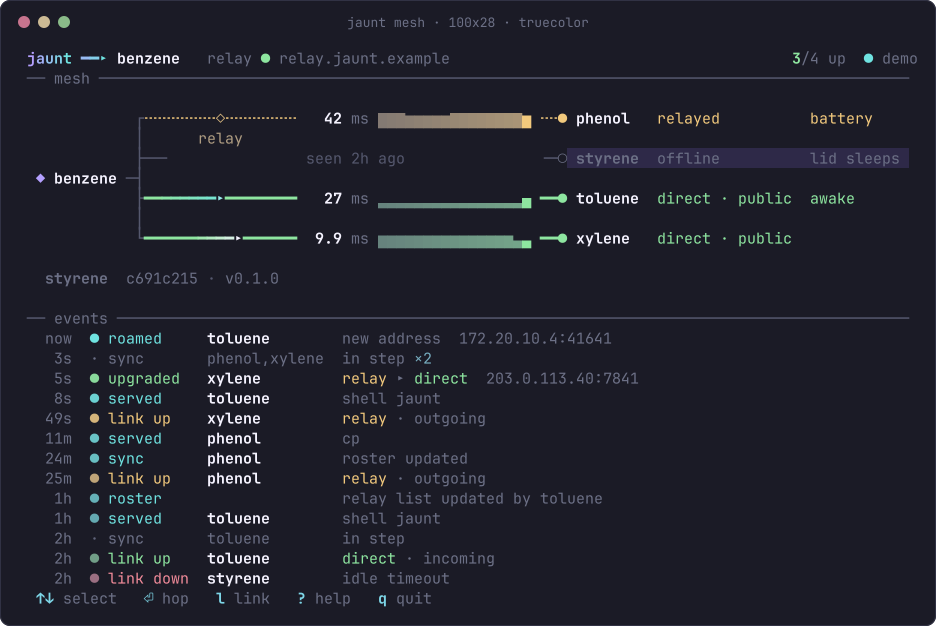
The jaunt mesh view on benzene: solid green lines to toluene and xylene, which are direct, a dotted amber line through the relay to phenol, styrene greyed out as offline, latency and a sparkline on each link, and an event log of roams, syncs and path upgrades underneath.

The live mesh

jaunt with no arguments draws every linked machine from the one you sit at. Solid green is a direct path, dotted amber goes through the relay, grey is offline.

Each link shows its latency and a sparkline of the last minute; the log underneath records roams, syncs and path upgrades. Arrows choose, Enter hops, q quits.
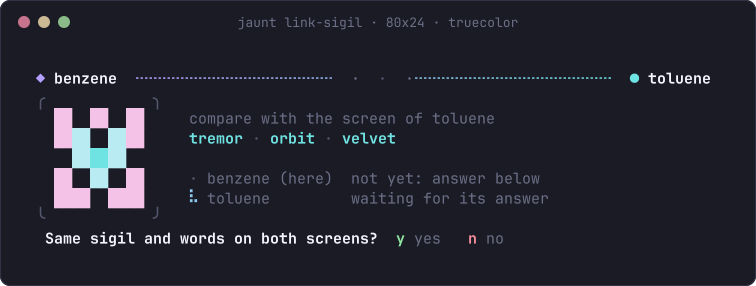
The pairing screen on benzene: a small square picture, the sigil, next to the three words tremor, orbit, velvet, with the question: same sigil and words on both screens? y yes, n no.

Linking two machines

jaunt link shows a code like 4127-tremor-kudos; type it on the other machine with jaunt join. Both screens show the same sigil and three words; press y on both if they match.

The code is the password for SPAKE2: someone in the middle gets one guess in 60 million, a wrong guess burns the code, and codes expire after 5 minutes.

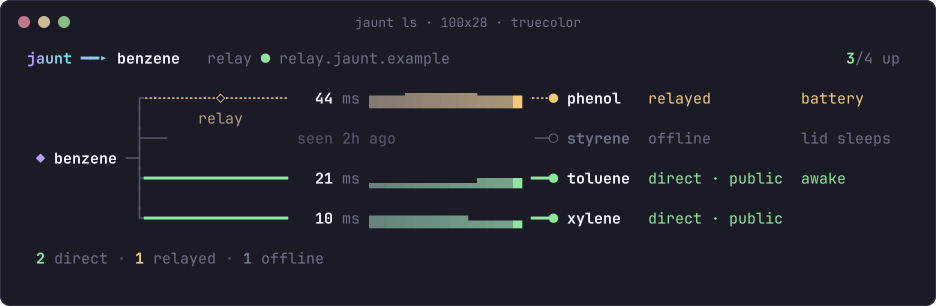
The output of jaunt ls: toluene and xylene direct at 21 and 10 ms, phenol relayed at 44 ms and on battery, styrene offline and seen 2 hours ago with lid sleeps, toluene marked awake; summary line 2 direct, 1 relayed, 1 offline.

The roster

jaunt ls lists every machine with its path, latency, sessions and host state.

jaunt host on keeps a laptop awake with the lid closed while it is on mains and below a heat limit; otherwise it sleeps as usual.

jaunt unlink toluene --kill-sessions revokes a lost machine on every machine that is online and lists those that have not heard yet.

Past the terminal

jaunt ports toluene lists what listens there; one key forwards a port and opens it in your browser. jaunt open toluene:7707 does it by name.

Forwards held by the service come back after sleep, a new network or a restart. rfwd reverses them; socks browses through the other machine's network.

jaunt tabs toluene pulls its open browser tabs. Links opened in a hop open in the browser you hopped from.

jaunt clip on shares the clipboard both ways. jaunt notify says when a long job is done. More

How it works

 your terminal                                               the other machine
 jaunt toluene ── daemon ════ QUIC + TLS 1.3 ════ daemon ── tmux session
                     │   direct when possible        │
                     └──── else through the relay ───┘

Each machine runs a small background service holding its own key.

Machines only accept keys on the shared member list, checked during the encrypted handshake.

Networking and encryption come from iroh.

Sessions live in tmux on the far machine and survive disconnects.

Install

On each machine, as your user:

curl -fsSL https://raw.githubusercontent.com/ZahakJ/jaunt/main/install.sh | sh

Options go after sh -s --, e.g. … | sh -s -- --name benzene. Then:

jaunt demo

One static binary in ~/.local/bin, no root. Linux x86_64 has a release binary; elsewhere, cargo build --release.

Latest release v0.2.0,

Download from the releases page

A mesh needs one self-hosted relay (iroh-relay): see the relay.

MIT licence. Next: Install, Pairing.