Abax
Abax is a soroban trainer. The soroban is the Japanese abacus: a frame of rods, each carrying one bead worth 5 above a beam and four beads worth 1 below it. Abax teaches which finger moves which bead, and in what order, for every kind of addition and subtraction; drills those moves; then fades the beads for mental calculation.

Linux, Windows, macOS, and Android 7.0 or newer. MIT licence.
What is in this manual
- Using Abax: installing it, how the soroban works, the finger rules, the fifteen skills of the curriculum, the drills, anzan, how the scheduler decides what you practise next, every setting, and the save file.
- Under the hood: building from source (including the Android APK without Gradle), how the soroban is drawn on the GPU, and where things live in the code.
Where the content comes from
The bead moves, the finger order and the multiplication and division
methods follow Takashi Kojima, The Japanese Abacus: Its Use and Theory
(Tuttle, 1954). The grading ladders and the flash anzan speeds were checked
against the Japanese federations’ published exam tables. The scheduler is
built on Bayesian Knowledge Tracing (Corbett and Anderson, 1995) and an
Elo-style ability estimate. Sources and the full bead-move tables:
research/soroban-mechanics-and-curriculum.md.
Source: https://github.com/ZahakJ/abax.
Getting started
Install
The commands below use v0.3.0; the newest version is on the
releases page. Check a
download with sha256sum -c SHA256SUMS.txt --ignore-missing.
| Platform | File |
|---|---|
| Linux x86_64 | abax-v0.3.0-linux-x86_64.tar.gz |
| Windows x86_64 | abax-v0.3.0-windows-x86_64.zip |
| macOS, Apple silicon | abax-v0.3.0-macos-aarch64.dmg |
| macOS, Intel | abax-v0.3.0-macos-x86_64.dmg |
| Android, 64-bit ARM | abax-v0.3.0-android-arm64-v8a.apk |
| Android, universal (adds 32-bit ARM and x86_64) | abax-v0.3.0-android-universal.apk |
Linux
curl -L https://github.com/ZahakJ/abax/releases/download/v0.3.0/abax-v0.3.0-linux-x86_64.tar.gz | tar xz
./abax-v0.3.0-linux-x86_64/install.sh
install.sh needs no root. It copies the binary to ~/.local/bin/abax
(or $XDG_BIN_HOME), the desktop entry to ~/.local/share/applications/
and the icon to ~/.local/share/icons/. The binary also runs in place,
./abax-v0.3.0-linux-x86_64/abax. It needs a Vulkan or OpenGL driver.
Windows
In PowerShell:
Invoke-WebRequest https://github.com/ZahakJ/abax/releases/download/v0.3.0/abax-v0.3.0-windows-x86_64.zip -OutFile abax.zip; Expand-Archive abax.zip -DestinationPath abax
Then run abax\abax.exe. The binary is not code-signed, so SmartScreen may
stop the first launch; choose “More info”, then “Run anyway”.
macOS
Download the dmg for your Mac (Apple menu > About This Mac: “Apple M1” or
later means Apple silicon, “Intel” means Intel), open it and drag
Abax.app to Applications.
The app is ad-hoc signed but not notarized, so the first launch says “Apple could not verify Abax”. Right-click the app > Open > Open; on macOS 15 and later, open it once, then click Open Anyway in System Settings > Privacy & Security. Or run once in a terminal:
xattr -cr /Applications/Abax.app
Android
On the phone, open the arm64-v8a APK link and install it, allowing installs from the browser when asked. Abax needs Android 7.0 (API 24) or newer. The universal APK also contains 32-bit ARM and x86_64 code; use it on an old 32-bit phone or an emulator. There is no sound on Android.
Your first session
- Home. The card at the top says what comes next. On a new profile that is the first lesson, “The rods, the beam and the beads”. Press Continue.
- The lesson. A few short paragraphs explain one idea. Below them the soroban plays demonstrations: the bead to move is ringed in vermilion, an arrow shows the direction, and a line of text names the finger (“Index finger: push the heaven bead down”). Use Next move to step through a demonstration by hand, Replay to see it again, and Next demo for the next example.
- Guided practice. Press Try it with hints. You get three items to work on the beads yourself. If you pause for 1.5 s, the next move is shown. Nothing here counts towards your record.
- The drill. Press Start the drill for ten items. Now the hint waits for the delay set in Settings (4 s by default) and every answer is recorded. A wrong answer replays the correct bead moves, in order.
- Back home. The card now offers the suggested next lesson as soon as its prerequisites are known well enough, or a planned session: a short warm-up, a focus drill on your weakest skill and a cool-down. The scheduler chapter explains how it chooses.
Nothing is locked. Open any lesson in any order, and tap I know this already on the ones you can skip (how that works). The home screen has eight entries:
| Entry | What it does |
|---|---|
| Practice | A free soroban. Tap or drag beads, or type digits. |
| Lessons | Every lesson, all open, with the suggested next one marked. |
| Drills | Pick a skill and a difficulty step yourself. |
| Anzan | A drill where the beads fade and you finish in your head. |
| Flash | Flash anzan with your own digits, count and speed. |
| Sprint | Sixty seconds, as many items as you can. |
| Stats | Momentum, per-skill mastery, accuracy and speed. |
| Settings | Rods, input, theme, finish, sound, data. |
Working the soroban
Touch and mouse. Tap an earth bead and it moves together with the beads between it and the beam. Tap the heaven bead to toggle it. Dragged beads snap to the nearer position on release. A bead’s hit area is the full width of its rod.
Keyboard. Digits set the active rod and move one rod to the right; Backspace clears the active rod and moves left; the Left and Right arrows move the active rod in free practice; Enter or Space checks the answer; Escape or Delete clears the soroban.
Keypad. An on-screen keypad sits under the soroban. Settings can turn it off or move it to the left.
The soroban
Parts and values
- Rods. Each rod is one decimal place. The rightmost rod in use is the units, the next one to the left the tens, and so on, exactly as you write numbers.
- Beam. The horizontal bar (the reckoning bar) divides every rod into two parts.
- Heaven bead. The single bead above the beam is worth 5.
- Earth beads. The four beads below the beam are worth 1 each.
- Frame. No part in the arithmetic.
A bead counts only when it touches the beam. So each rod shows one digit:
| Digit | Heaven bead | Earth beads at the beam |
|---|---|---|
| 0 | up (away) | none |
| 1 to 4 | up (away) | 1 to 4 |
| 5 | down (touching) | none |
| 6 to 9 | down (touching) | 1 to 4 |
Four ones and one five are exactly enough for 0 to 9, so every digit has one picture. Older soroban had 5 earth beads and 2 heaven beads; the 1:4 form became the Japanese standard in the first half of the twentieth century.
Unit dots
The beam carries a small dot on every third rod. You choose one dotted rod as the units rod; the dots to its left then fall on the thousands, the millions, and so on, the way commas group digits on paper. In the diagram above the rightmost rod is the units rod and the dot on the second rod marks the thousands, so the soroban shows 20579.
Abax counts rods from the right: the rightmost rod is always the units rod and carries a dot, as does every third rod to its left.
Reading a number
Read left to right, one rod at a time, the way you read written digits. For each rod: is the heaven bead down (5) or not (0); how many earth beads touch the beam (0 to 4); add the two. Leading rods with nothing at the beam are leading zeros.
Setting a number
Start from a clear soroban: every heaven bead up, every earth bead down. Then set the digits from left to right, with the finger the finger rules give:
- Set 3: the thumb pushes three earth beads up.
- Set 7: the index finger brings the heaven bead down and the thumb pushes two earth beads up, in one pinch.
- Set 406: four earth beads up on the hundreds rod, nothing on the tens, heaven bead down and one earth bead up on the units.
These are the first demonstrations of lesson S0 in Abax (3, 7, 50, 406).
Clearing
On a physical soroban you clear by tilting it towards you so every bead drops away from the beam, laying it flat and running the index finger along the top of the beam to push the heaven beads up. In Abax the Clear button (or Escape) does the same with a short sweep from the right.
How many rods
Abax offers 9, 13, 17, 21, 23 and 27 rods. A real soroban always has an odd number of rods; 13 is the usual beginner size and 23 the usual school and exam size. On phones, drills size the soroban to the problem.
Finger rules
Every move is made with one of two fingers, in a fixed order. Abax shows the finger with every move and follows the order below.
Which finger
The standard Japanese method uses two fingers of one hand:
| Move | Finger |
|---|---|
| Earth beads up, towards the beam (adds) | thumb |
| Earth beads down, away from the beam (subtracts) | index |
| Heaven bead down, to the beam (adds 5) | index |
| Heaven bead up, away from the beam (subtracts 5) | index |
The thumb only pushes up. Everything else is the index finger.
Kojima’s six ordering rules
When one digit needs both a heaven-bead move and an earth-bead move, or needs a second rod, the order is fixed. Kojima (1954, chapter III) gives six rules; Japanese school materials teach the same.
- Adding 6 to 9 directly (for example 1 + 6): bring the heaven bead down and push the earth beads up at the same time, as one pinch.
- Subtracting 6 to 9 directly (for example 9 − 7): earth beads down first, then the heaven bead up.
- Five-complement addition (for example 4 + 3, done as +5 −2): heaven bead down first, then the earth beads down, in quick succession.
- Five-complement subtraction (for example 7 − 3, done as +2 −5): earth beads up first, then the heaven bead up.
- Ten-complement addition (for example 4 + 8, done as −2 then +1 on the left): finish the unit rod first, then carry 1 onto the tens rod.
- Ten-complement subtraction (for example 11 − 7, done as −1 on the left then +3): borrow 1 from the tens rod first, then work the unit rod.
Across rods the rule is simpler: numbers are entered from the highest place to the lowest, left to right, one rod at a time, carrying and borrowing as you go. A carry always lands on a rod you have already visited, never on one still to come.
Some English tutorials narrate the carry first (“add 10, take away 3”). The hand order taught in Japan, and used by Abax, is the one above: complement first and carry second when adding, borrow first and complement second when subtracting.
The move notation
The manual writes moves on one rod like this:
| Notation | Meaning | Finger |
|---|---|---|
+1 … +4 | push that many earth beads up | thumb |
−1 … −4 | push that many earth beads down | index |
+5 | heaven bead down | index |
−5 | heaven bead up | index |
+1 left, −1 left | carry to, or borrow from, the next rod to the left | thumb, index |
So “4 + 3” on a rod showing 4 is +5, −2; “4 + 8” is −2, +1 left.
The curriculum
Fifteen skills: twelve bead skills (S0 to S11) and three mental skills
(A1 to A3). Each has a lesson, a drill generator that only produces items
exercising its rule, and a difficulty ladder (crates/abax-core/src/curriculum.rs,
generator.rs).
The graph
Nothing is locked. The prerequisites below are the suggested path, not a gate.
A skill’s prerequisites count as met when every one of them has a knowledge estimate of at least 0.80 (see the scheduler). That threshold drives three things:
- The suggested next lesson. The lesson list marks one lesson next, and Home’s Continue opens it: the first skill, in the order of the table, whose prerequisites are met and which you have neither practised nor marked as known. It does not wait for the prerequisite to be mastered.
- The “builds on” note. Open a lesson whose prerequisites are not met yet and a small line under its title names them, for example Builds on: S10 Multiplication, each a link to that lesson. It appears once.
- A light review in planned sessions, described under the session planner.

Skipping what you know
Every lesson has I know this already at the top right. It marks the skill as known, sets its knowledge estimate to 0.80 (never lowering a higher one) and moves on to the suggested next lesson. A known skill counts as met and is mixed into focus drills and cool-downs like any practised skill.
A lesson you marked shows Reset this skill in the same place; Settings → Data → Reset one skill does the same for any skill. A reset puts that one skill back to new, as if never met; your history in Stats is kept. When the skill has real practice behind it, the reset asks for a second tap.
| Id | Skill | Prerequisites |
|---|---|---|
| S0 | Reading and setting numbers | none |
| S1 | Adding without complements | S0 |
| S2 | Subtracting without complements | S0 |
| S3 | Adding with the five-complement | S1 |
| S4 | Subtracting with the five-complement | S2, S3 |
| S5 | Adding with the ten-complement | S3 |
| S6 | Subtracting with the ten-complement | S4, S5 |
| S7 | Combined complements | S5, S6 |
| S8 | Multi-digit addition | S7 |
| S9 | Mixed addition and subtraction | S8 |
| S10 | Multiplication | S8 |
| S11 | Division | S10 |
| A1 | Anzan: the mental soroban | S7 |
| A2 | Flash anzan, one digit | A1, S9 |
| A3 | Flash anzan, more digits | A2 |
Moves below use the notation from Finger rules: +3 is three
earth beads up (thumb), −2 two earth beads down (index), +5 and −5 the
heaven bead down and up (index), +1 left a carry onto the next rod.
Ladders
Each skill climbs a ladder of steps, raising one thing at a time: first the number of operands, then digits, then time pressure. “Gentle” timing allows 2.0 times your typical time per operand, “tight” 1.3 times, never less than 1.2 s per operand.
| Ladder | Used by | Steps (digits × operands, timing) |
|---|---|---|
| Setting | S0 | 1, 2, 3 digits untimed; 3 gentle; 4 gentle; 5 tight |
| Simple | S1, S2 | 1×2, 1×3, 1×5 untimed; 1×5 gentle; 1×8 gentle; 1×8 tight |
| Complement | S3 to S7 | same steps as Simple |
| Multi-digit | S8, S9 | 2×2, 2×3, 2×5, 3×3, 3×5 untimed; 2×5 gentle; 3×5 gentle; 3×10 tight |
| Multiply | S10 | 1×1, 2×1, 3×1, 2×2 untimed; 2×2 gentle; 3×2 gentle; 3×2 tight |
| Divide | S11 | 2÷1, 3÷1, 4÷1, 3÷2 untimed; 4÷2 gentle; 4÷2 tight |
| Anzan | A1 | 1×2, 1×3, 1×5 untimed; 1×5 gentle; 2×3 gentle; 2×5 tight |
| Flash, one digit | A2 | see Anzan and flash anzan |
| Flash, more digits | A3 | see Anzan and flash anzan |
For multiplication “3×2” means a 3-digit multiplicand times a 2-digit multiplier; for division “4÷2” a 4-digit dividend and a 2-digit divisor.
S0: Reading and setting numbers
Teaches the rods, the beam, the values of the beads and the unit dots.
Drills “Set this number” and “Read this soroban”, half each, with 1 to 5
digits. Set 7 is +5, +2 (one pinch); set 406 is +4 on the hundreds, then
+5, +1 on the units.
S1: Adding without complements
Rule: when the beads you need are free, push them to the beam. The thumb
pushes earth beads up, the index finger brings the heaven bead down; for 6
to 9 both move together. Drills chains of one-digit additions in which
no complement is ever needed. Examples from the lesson: 2 + 2 is +2;
3 + 5 is +5; 1 + 6 is +5, +1 in one pinch; 12 + 36 is +3 on the tens,
then +5, +1 on the units.
S2: Subtracting without complements
Rule: move beads away from the beam with the index finger; for 6 to 9,
earth beads first, then the heaven bead. Drills one-digit subtraction
chains with no complement. Examples: 4 − 3 is −3; 8 − 5 is −5; 9 − 7 is
−2, −5; 87 − 52 is −5 on the tens, −2 on the units.
S3: Adding with the five-complement
Rule: when the earth beads you need are not free, add 5 and take away
the “small friend” (the number that makes 5 with it: 1 and 4, 2 and 3).
Heaven bead first, then the earth beads, both with the index finger.
Drills addition chains that must use the five-complement at least once
and never need a carry. Examples: 1 + 4 is +5, −1; 3 + 3 is +5, −2;
4 + 2 is +5, −3; 23 + 34 is +5, −2 on the tens and +5, −1 on the
units.
S4: Subtracting with the five-complement
Rule: when the earth beads to take are not at the beam, take 5 away and
give back the small friend: earth beads up with the thumb first, then the
heaven bead up with the index finger. Drills subtraction chains that use
it. Examples: 6 − 4 is +1, −5; 5 − 2 is +3, −5; 7 − 3 is +2, −5;
65 − 42 is +1, −5 on the tens and +3, −5 on the units.
S5: Adding with the ten-complement
Rule: when the sum would pass 9, take away the “big friend” (the number
that makes 10: 1 and 9, 2 and 8, 3 and 7, 4 and 6, 5 and 5) on this rod,
then carry 1 onto the rod to the left. Drills addition chains that need
a carry at least once (five-complements may appear too). Examples:
4 + 8 is −2, +1 left; 9 + 1 is −4, −5, +1 left (taking away 9, the
friend of 1); 5 + 5 is −5, +1 left; 38 + 27 is +5, −3 on the tens
(a five-complement), then −3 on the units and +1 left, giving 65.
S6: Subtracting with the ten-complement
Rule: when the rod does not hold enough, borrow 1 from the rod on the
left first, then add the big friend on this rod. Drills subtraction
chains that need a borrow. Examples: 11 − 7 is −1 left, +3;
10 − 1 is −1 left, +5, +4; 15 − 8 is −1 left, +2; 62 − 38 is +2, −5
on the tens, then −1 left, +2 on the units, giving 24.
S7: Combined complements
Rule: the ten-complement’s own move on the rod sometimes cannot be made
directly and needs a five-complement inside it. 7 + 6: taking away 4 (the
friend of 6) from 7 is impossible with two earth beads up, so take 4 through
5: +1, −5, then +1 left, giving 13. In subtraction, 12 − 7: borrow
(−1 left), then add 3 to the 2 on the units rod, which needs the small
friend: +5, −2, giving 5. Drills mixed chains that must contain a
combined move. Other lesson examples: 6 + 8 is +3, −5, +1 left;
13 − 6 is −1 left, +5, −1.
Exactly these one-rod additions are combined: 5 + 6 to 5 + 9, 6 + 6 to
6 + 8, 7 + 6, 7 + 7 and 8 + 6. (8 + 7 is not: 8 has three earth beads up, so
−3, +1 left works directly.)
S8: Multi-digit addition
Rule: nothing new. Add each digit on its own rod, from the left; carries
travel left, so they never land on a rod you still have to visit.
Drills chains of 2- and 3-digit numbers, 2 to 10 operands, any
complement allowed. Example: 478 + 365. Hundreds: 4 + 3 is +5, −2. Tens:
7 + 6 is the combined move +1, −5, then +1 on the hundreds. Units:
8 + 5 is −5, then +1 on the tens. Result 843. And 1999 + 1, where one
carry ripples across three rods: −4, −5 on the units, tens and hundreds in
turn, then +1 on the thousands.
S9: Mixed addition and subtraction
Rule: every operation lands on the running total, so plus and minus mix
freely. Before a subtraction, look left to see where a borrow will come
from. Drills mixed chains of multi-digit numbers. Example:
843 − 599. Hundreds: −5. Tens: 4 − 9 borrows 1 from the hundreds and adds
1 to the tens, which on a rod showing 4 is +5, −4. Units: 3 − 9 borrows
from the tens (5 − 1 is +4, −5), then adds 1 on the units. Result 244.
S10: Multiplication
Method: Kojima’s standard method. Set the multiplier on the left and the multiplicand to its right with two empty rods between. Multiply the rightmost digit of the multiplicand by each multiplier digit from left to right. Each two-digit partial product goes with its tens on the first rod to the right of the multiplicand digit being used, and each next one shifts a rod further right. Clear the multiplicand digit, move to the next one to the left. The product’s units end up (digits of the multiplier + 1) rods to the right of the multiplicand’s units. Drills products from 1 × 1 digits up to 3 × 2 digits; you type the answer and can step through the worked procedure.
Abax’s own walk-through of 23 × 12:
- Set the multiplier 12 on the left.
- Set the multiplicand 23 with its units on the unit rod, two empty rods after the multiplier.
- 3 × 1 = 03: add it with its tens on the first rod right of the 3.
- 3 × 2 = 06: add it one rod further right.
- Clear the 3.
- 2 × 1 = 02, tens on the first rod right of the 2; 2 × 2 = 04 one rod further right.
- Clear the 2 and read 276, three rods right of where the multiplicand’s units were.
S11: Division
Method: the standard method (商除法, shōjohō). Set the dividend with its units on a unit rod and the divisor on the left, four empty rods away. Compare the divisor with the leading digits of the dividend and guess a quotient digit; it goes two rods left of the dividend’s leading digit when the divisor goes into that one digit, one rod left when two digits are needed. Subtract quotient × divisor digit by digit. If a partial product cannot be subtracted, the guess was too large: lower it by one and add back what was already taken. If what remains is still at least the divisor, the guess was too small: raise it and subtract once more. Drills exact divisions from 2-digit ÷ 1-digit up to 4-digit ÷ 2-digit.
Abax’s walk-through of 391 ÷ 17 revises twice: try 3 (from 3 ÷ 1), find 3 × 7 cannot be taken, revise to 2 and take 2 × 7; then try 5, revise to 4, then to 3, and take 3 × 7. The quotient 23 is read three rods left of the dividend’s units.
A1: Anzan, the mental soroban
Teaches calculating on a soroban you picture. The start of each item is set on the beads, the beads fade to glass and vanish, and you add the rest in your head and type the total. Drills one-digit chains of mixed addition and subtraction with any complement, then 2-digit chains. Details in Anzan and flash anzan.
A2 and A3: Flash anzan
Teaches adding numbers that flash one after another, without beads at all. A2 uses one-digit numbers, A3 two and three digits. The ladders are in Anzan and flash anzan.
Drill types
A drill is a short run of items, 8 to 15 in a planned session, 3 to 30 when you choose one yourself under Drills. Every item has exactly one focus skill, and the generator builds it so that the bead moves it needs use that skill’s rule and nothing you have not met yet. A “small friends” drill never asks for a carry; a “combined” drill always contains at least one combined move.
The item kinds
| Kind | You see | You do | Skills |
|---|---|---|---|
| Set this number | “Set 4071” and a clear soroban | Move the beads until they show it | S0 |
| Read this soroban | A number on the beads, digits hidden | Type the number | S0 |
| Chain | “6 + 5 + 6”, the start already on the beads | Work each operation on the beads | S1 to S9 |
| Multiplication | “34 × 6” | Type the product; the worked procedure is available | S10 |
| Division | “391 ÷ 17” | Type the quotient; the worked procedure is available | S11 |
| Anzan chain | A chain whose start fades from the beads | Finish in your head, type the total | A1 |
| Flash | Numbers shown one at a time | Type the sum | A2, A3 |
Working on the beads. For “set” and chain items you do not type the answer. The current operand is highlighted in the problem line; Abax follows the running total on the beads and accepts the item once the beads have shown the final answer for about half a second. You can also press Enter to check early (the Check button).
Hints. If you make no move for the hint delay (4 s by default, see Settings; 1.5 s in a lesson’s guided practice), the next move is shown on the soroban: the beads to move are haloed in vermilion, with an arrow, for one rod at a time.
When you are wrong. Abax shows the correct answer and replays the correct bead moves on the soroban in order, from where the item started. For multiplication and division the step-by-step procedure takes that role.
Where the drills come from
- A planned session (the Continue button on the home screen): warm-up, focus and cool-down drills chosen by the scheduler. About 30 % of the focus drill’s items are drawn from other skills you have already practised, each at its own current step.
- Drills on the home screen: choose a skill (grouped as set and read, add and subtract, longer numbers, multiply, divide, anzan), a step on its ladder (it starts at your current step; you can move it either way) and the number of items. Every skill can be chosen, whatever you have learned so far; it starts on the furthest skill you have met.
- Sprint: choose a skill and a step; you get as many items as you can answer in 60 seconds. Mistakes do not end it.
- Lessons end in three guided items (not recorded), then a 10-item drill.
Difficulty and time pressure
Each skill’s ladder (see the curriculum) raises one thing at a time: more operands, then more digits, then time pressure. Timed steps have a time budget per operand: 2.0 times your typical time on a “gentle” step, 1.3 times on a “tight” one, never below 1.2 s. The budget is not a countdown on the screen; the scheduler uses it to decide when you are fluent enough to go further: on a timed step you step up only when your typical time is at most 80 % of the budget.
Every answer and its time goes into the history and the scheduler, except in guided lesson practice.
Anzan and flash anzan
Anzan (暗算) is mental calculation. Soroban-trained anzan is a particular kind: you picture a soroban and move its beads in your mind with the same moves your fingers make. Expert users hold the numbers as a visual image, rod by rod, rather than as words.
Schools build the image in stages: the real soroban, then covered, then finger movements in the air, then no movement. Abax does this in two skills, after the bead skills.
A1: fading beads
An anzan item is a chain, like a bead drill. The first number is set on the soroban and you see it for a moment (0.8 s). Then the beads fade over 2.5 s: the body of each bead turns to translucent glass first, the highlights stay until late, and in the last quarter everything vanishes. The frame stays. You finish the chain on the soroban you now only imagine, and type the total.
Kojima recommends moving the index finger and thumb in the air as if working real beads.

The A1 ladder: one-digit chains of 2, 3 and 5 numbers untimed, then 5 with gentle timing, then 2-digit chains of 3 (gentle) and 5 (tight). The chains mix addition and subtraction and may use every complement. The Anzan button on the home screen starts an 8-item anzan drill at your current step.
A2 and A3: flash anzan
Flash anzan (フラッシュ暗算) shows numbers one at a time in the same place; you add them as they appear and type the total after the last one. There are no beads on screen at all. The form was developed in Japan by Yūji Miyamoto and is now examined and competed in by the Japanese soroban federations; at the top level, fifteen 3-digit numbers flash in under two seconds.
Each number in Abax is shown for the display time, with a short blank between numbers (12 % of the display time, between 0.04 and 0.2 s) so that two equal numbers in a row still read as two. A run is five rounds; after each answer you see “Correct” or the true total.
The ladders
The display time is per number.
A2, one digit:
| Step | Numbers | Display time | Whole sequence |
|---|---|---|---|
| 1 | 3 | 1.5 s | 4.5 s |
| 2 | 5 | 1.5 s | 7.5 s |
| 3 | 5 | 1.2 s | 6.0 s |
| 4 | 5 | 1.0 s | 5.0 s |
| 5 | 8 | 0.8 s | 6.4 s |
| 6 | 10 | 0.6 s | 6.0 s |
| 7 | 10 | 0.5 s | 5.0 s |
| 8 | 15 | 0.4 s | 6.0 s |
A3, more digits:
| Step | Digits | Numbers | Display time | Whole sequence |
|---|---|---|---|---|
| 1 | 2 | 3 | 1.5 s | 4.5 s |
| 2 | 2 | 5 | 1.2 s | 6.0 s |
| 3 | 2 | 5 | 1.0 s | 5.0 s |
| 4 | 2 | 8 | 0.8 s | 6.4 s |
| 5 | 2 | 10 | 0.6 s | 6.0 s |
| 6 | 3 | 5 | 1.0 s | 5.0 s |
| 7 | 3 | 10 | 0.8 s | 8.0 s |
| 8 | 3 | 15 | 0.5 s | 7.5 s |
Every step is faster, longer or wider than the one before it. The Japan Flash Anzan Association’s exam ladder starts at three one-digit numbers in 5 s (1.67 s each); its tenth dan is fifteen 3-digit numbers in 3 s (0.2 s each). Free flash goes down to 0.2 s.
The usual step-up and step-down rules move you along the ladder; a message says when you moved up or eased back a step.
Free flash
The Flash button on the home screen opens flash anzan with your own
settings: 1 to 4 digits, 2 to 20 numbers, 0.2 to 3.0 s per number. Abax
remembers them (flash_digits, flash_count, flash_ms in the
save file). Answers in free flash are recorded under A2 when
the numbers have one digit and under A3 otherwise.
The adaptive scheduler
The scheduler decides what to practise next from your answers and their
times. The numbers below are those in crates/abax-core/src/scheduler.rs.
| Piece | Question |
|---|---|
| Bayesian Knowledge Tracing | Do you know this rule? |
| Accuracy average | How are you doing lately? |
| Time average | How fast are you when you are right? |
| Elo ability | Is this particular step too hard for you? |
| Ladder rules | Should the next items be harder or easier? |
| Mastery gate | Are you done with this skill? |
| Forgetting and review | Have you started to lose it? |
| Session planner | Which drills, in which order, today? |
Do you know the rule? Bayesian Knowledge Tracing
Bayesian Knowledge Tracing (Corbett and Anderson, 1995) keeps one number per skill, L, the probability that you know it, allowing for guesses and slips:
| Parameter | Value | Meaning |
|---|---|---|
| P(L₀) | 0.10 | before any answer, a 10 % chance you already know it |
| P(G) | 0.20 | chance of a right answer without knowing the rule (guess) |
| P(S) | 0.10 | chance of a wrong answer although you know it (slip) |
| P(T) | 0.10 | chance of learning it from one more item |
After a right answer, Bayes’ rule gives
post = L (1 − P(S)) / ( L (1 − P(S)) + (1 − L) P(G) )
after a wrong answer
post = L P(S) / ( L P(S) + (1 − L) (1 − P(G)) )
and then the chance that this item taught you the rule is added:
L′ = post + (1 − post) P(T).
By hand
Start at L = 0.10 and answer correctly.
- Numerator: 0.10 × 0.90 = 0.09. Denominator: 0.09 + 0.90 × 0.20 = 0.27. post = 0.09 / 0.27 = 0.333.
- Learning step: 0.333 + 0.667 × 0.10 = 0.400.
Correct again from 0.400: 0.36 / (0.36 + 0.60 × 0.20) = 0.75, then 0.75 + 0.25 × 0.10 = 0.775. Two more right answers give 0.9455 and 0.9886.
Now a wrong answer from 0.9886: 0.09886 / (0.09886 + 0.0114 × 0.80) = 0.9156, plus the learning step: 0.924. The same slip after three right answers, from 0.9455, gives 0.09455 / (0.09455 + 0.0545 × 0.80) = 0.684, then 0.716.
The curriculum graph uses L directly: a skill’s prerequisites count as met when every one has L ≥ 0.80. Three right answers in a row on S3 (0.9455) are already enough to make S5 the suggested next step.
I know this already sets L to exactly 0.80 (and θ to the matching ln(0.8 / 0.2) = 1.386) without adding any answers. One right answer from there: 0.72 / (0.72 + 0.20 × 0.20) = 0.947, then 0.953. One wrong answer: 0.08 / (0.08 + 0.20 × 0.80) = 0.333, then 0.400, back below the threshold.
How are you doing lately? The accuracy average
An exponentially weighted moving average (EWMA) of accuracy tracks recent performance:
acc′ = acc + 0.2 × (correct − acc), with correct = 1 or 0, starting at 0.5.
Each answer moves the average a fifth of the way towards itself, so it mostly reflects the last ten or so items. From 0.5, right answers give 0.6, 0.68, 0.744; a wrong one then drops it to 0.744 − 0.2 × 0.744 = 0.595. Ten right answers in a row from 0.5 reach 0.946.
How fast? The time average
An EWMA of the logarithm of seconds per operand, on right answers only:
log_t′ = log_t + 0.3 × (ln(seconds per operand) − log_t).
Your “typical time” is exp(log_t). It starts at three times the skill’s benchmark. Benchmarks, in seconds per operand: S0 3.0; S1 and S2 2.5; S3 and S4 3.0; S5, S6 and S7 3.5; S8 and S9 5.0; S10 12; S11 15; A1 2.0; A2 and A3 1.0.
Is this step too hard? Elo ability
You and the item are rated on one scale, as in chess. Each item has a difficulty d computed from its step:
d = base(skill) + 0.40 (digits − 1) + 0.25 (operands − 2) + 0.50 [timed] + 0.30 [flash]
with base −1.5 for S0; −1.0 for S1 and S2; 0.0 for S3 and S4; 0.5 for S5 and S6; 1.0 for S7; 1.5 for S8 and A1; 2.0 for S9 and S10; 2.5 for S11 and A2; 3.0 for A3. Your ability θ on the skill starts at 0. The predicted chance of a right answer is the logistic curve
P = 1 / (1 + e^−(θ − d)),
and after each answer
θ′ = θ + U(n) × (correct − P), with U(n) = 1 / (1 + 0.06 n),
where n is how many items of this skill you have answered. A surprise moves θ a lot, an expected result very little, and U shrinks as evidence accumulates: U(0) = 1, U(10) = 0.625, U(100) = 0.14.
Harder or easier? The ladder rules
Every skill has a ladder of steps. After each answer:
Step down (if not already on the first step) when you have made two errors in a row on this step, or when accuracy has fallen below 0.60 after at least 6 items on the step.
Step up when all of these hold:
- accuracy ≥ 0.85;
- at least 8 items on this step;
- the Elo prediction for this step, P, is at least 0.85;
- on a timed step: typical time ≤ 0.8 × the time budget that was fixed when you entered the step;
- when the next step is the first timed one: accuracy ≥ 0.90.
A worked session
A learner starts S3 (adding with the five-complement) at step 1: two one-digit operands, untimed, so d = 0. Each item takes 4.0 s, which is 2.0 s per operand. They answer right, right, right, wrong, then right eight times. These are the scheduler’s actual numbers:
| Item | Answer | L | acc | typical s/operand | θ | Step |
|---|---|---|---|---|---|---|
| 1 | right | 0.400 | 0.600 | 5.73 | 0.500 | 1 |
| 2 | right | 0.775 | 0.680 | 4.18 | 0.856 | 1 |
| 3 | right | 0.946 | 0.744 | 3.35 | 1.122 | 1 |
| 4 | wrong | 0.716 | 0.595 | 3.35 | 0.483 | 1 |
| 5 | right | 0.927 | 0.676 | 2.87 | 0.791 | 1 |
| 6 | right | 0.985 | 0.741 | 2.58 | 1.031 | 1 |
| 7 | right | 0.997 | 0.793 | 2.39 | 1.224 | 1 |
| 8 | right | 0.999 | 0.834 | 2.26 | 1.384 | 1 |
| 9 | right | 1.000 | 0.867 | 2.18 | 1.520 | 1 |
| 10 | right | 1.000 | 0.894 | 2.13 | 1.636 | 1 |
| 11 | right | 1.000 | 0.915 | 2.09 | 1.738 | 2 |
| 12 | right | 1.000 | 0.932 | 1.82 | 1.849 | 2 |
Follow item 1 through every piece:
- L: 0.10 → 0.400, as computed above.
- acc: 0.5 + 0.2 × (1 − 0.5) = 0.6.
- time: the average starts at ln(3 × 3.0) = ln 9 = 2.197. The sample is ln 2.0 = 0.693. 2.197 + 0.3 × (0.693 − 2.197) = 1.746, and e^1.746 = 5.73 s.
- Elo: P = 1 / (1 + e^0) = 0.5 and U(0) = 1, so θ = 0 + 1 × (1 − 0.5) = 0.5.
Item 2’s Elo update: P = 1 / (1 + e^−0.5) = 0.622, U(1) = 1 / 1.06 = 0.943, θ = 0.5 + 0.943 × 0.378 = 0.856.
Why no step up before item 11? At item 9 the learner already had 9 items on the step, L near 1 and accuracy 0.867, but the Elo prediction was 1 / (1 + e^−1.520) = 0.82, under 0.85. At item 10 it was 0.837. At item 11, θ = 1.738 gives 0.850, accuracy is 0.915, and the next step is still untimed: up to three operands. The wrong answer at item 4 cost about three items.
Readiness follows the live estimate. S3’s L passed 0.80 at item 3, which made S5 a suggested next step (and S4, once S2 is there too); the error at item 4 took that back until item 5.
Are you done? The mastery gate
A skill is marked mastered when all five hold:
- L ≥ 0.95;
- at least 10 answers on the skill;
- accuracy ≥ 0.90;
- you have reached at least the second-to-last step of its ladder, which for most skills is the first timed one;
- typical time ≤ 1.5 × the skill’s benchmark.
Four lucky answers reach L = 0.989 but fail the count. The learner above, after twelve items, is on step 2 of 6: S3 counts as met, but is not mastered.
Have you started to lose it? Forgetting and review
L decays with the days since the skill was last practised:
L_eff = L × e^(−days / τ), with τ = 14 × review interval (in days).
A mastered skill starts with a review interval of 1 day. It is due for review when L_eff falls below 0.80 or when the interval has passed. Example: L = 0.96, 14 days without practice, interval 1 day: τ = 14 and L_eff = 0.96 × e^−1 = 0.353, clearly due. Had the interval grown to 10 days, τ = 140 and L_eff = 0.869: not due by decay, but due because 14 days exceeds 10.
When you answer a due review with accuracy ≥ 0.90, the interval grows by a factor of 1.6, up to 60 days. If accuracy on a mastered skill drops below 0.70, the mastered mark is removed and the interval resets to 1 day.
What today? The session planner
A planned session is three short drills. They pick from the skills on the suggested path (prerequisites met) plus every skill you have already met, practised or marked as known. A gap in the prerequisites never stops it.
- Warm-up, 7 items. The due review that has waited longest, at its current step. If nothing is due and the focus skill below has a prerequisite under 0.80 (you went ahead of the suggested path), a light review of that prerequisite instead: 5 untimed items at its current step, the weakest prerequisite first. Otherwise the most recently mastered skill at its top step. Target success about 90 % (85 % for the light review).
- Focus, 12 items. Among those skills that are not yet mastered, sort by L_eff and take the weakest, with probability 0.7, or the second weakest, with probability 0.3. About 30 % of its items come from other skills you have already met, each at its own step. Target success about 80 %. The focus runs whatever the state of its prerequisites.
- Cool-down, 6 items. Untimed items from the skills you know well (L_eff ≥ 0.80), strongest first, mixed together. A skill marked as known starts here at exactly 0.80.
An example with a gap. A new learner opens S10 straight away and answers six multiplication items, half of them right, and has also done some S0. S10 is now a skill they have met, so the planner can choose it; with the lowest L it is the usual focus. Its prerequisite S8 has never been touched (L = 0.10), nothing is due, so the warm-up becomes five untimed S8 items at step 1, and then the twelve S10 items run as normal.
On a brand-new profile the only skill on the path is S0, so the plan is a single 12-item S0 drill. And before any of this, the home screen’s Continue sends you to the suggested next lesson, the first skill on the path you have neither tried nor marked as known.
Momentum
The stats screen shows the last 14 days: items, minutes, days active, and a “momentum” figure that halves every three days without practice.
Sources
- Corbett, A. T. and Anderson, J. R. (1995), “Knowledge tracing: Modeling the acquisition of procedural knowledge”, User Modeling and User-Adapted Interaction 4: 253–278.
- Pelánek, R. et al., “Elo-based learner modeling for the adaptive practice of facts”, User Modeling and User-Adapted Interaction (the uncertainty function U(n) = α / (1 + βn), with α = 1 and β = 0.06).
- Klinkenberg, Straatemeier and van der Maas (2011), Math Garden: item difficulty and ability on one logistic scale.
- Rohrer and Taylor (2007), on interleaved practice.
Settings
Open Settings from the home screen. Every change is applied at once and saved with your profile; the name in brackets is the field in the save file.

Soroban
| Setting | Choices | Default | What it does |
|---|---|---|---|
Rods (rod_count) | 9, 13, 17, 21, 23, 27 | 13 (9 on a new Android profile) | Rods on the free-practice soroban and the upper limit for drills. Drills use fewer when the problem needs fewer, so beads stay large on phones. |
Beads move by (input_mode) | tap, drag, both | both | Tap moves a bead group in one go; drag lets beads follow the finger and snap on release. |
Show the number under the rods in free practice (show_numbers) | on, off | on | The digit under each rod. Drills decide for themselves: a “read” item hides them, anzan hides them. |
Show the on-screen keypad (show_keypad) | on, off | on | Items that need a typed answer always show it. |
Left-handed layout (left_handed) | on, off | off | Puts the keypad on the left. |
Hint after (hint_delay_seconds) | 1.5 to 10 s | 4 s | How long Abax waits after your last move before showing the next one in a drill. Guided practice in lessons always uses 1.5 s. |
Appearance
| Setting | Choices | Default | What it does |
|---|---|---|---|
Theme (theme) | system, light, dark | system | Paper and ink, or the dark variant. “system” follows the operating system. |
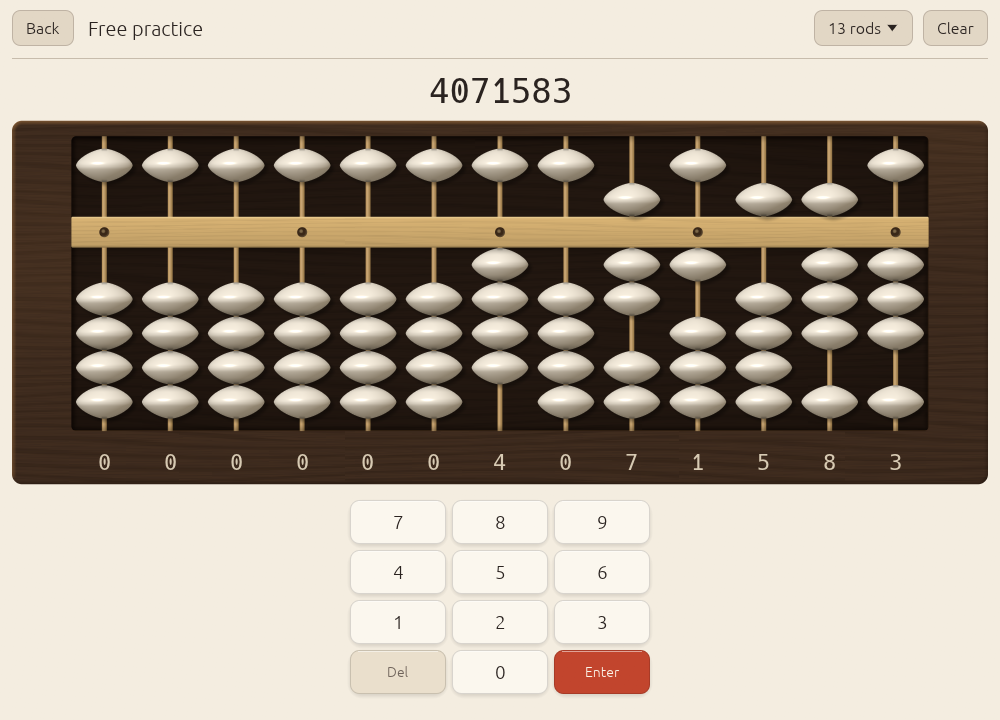
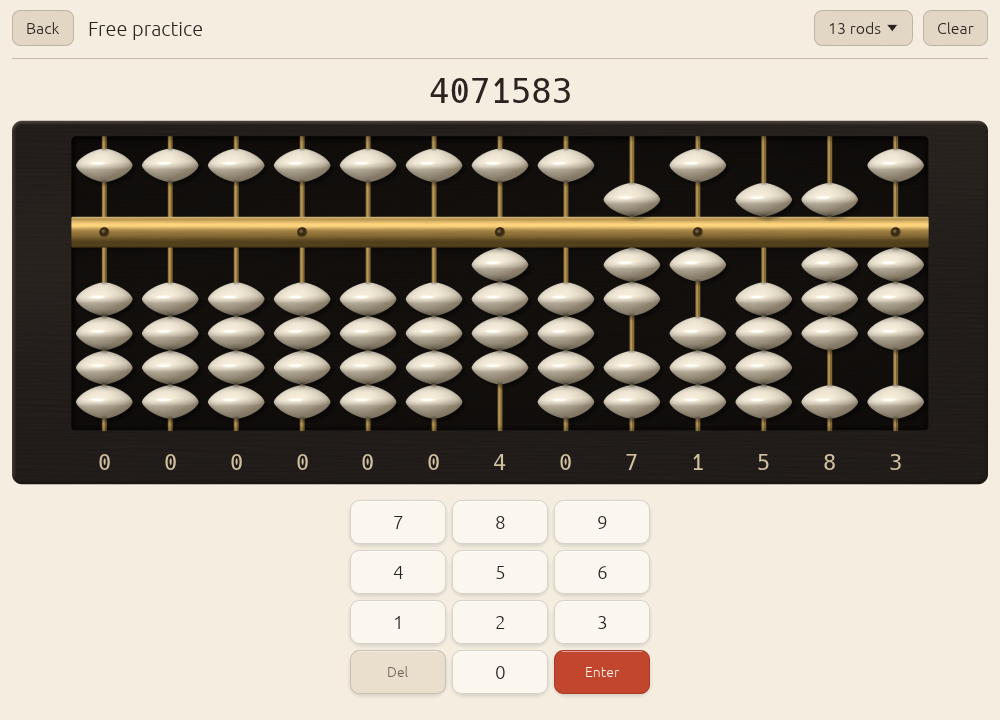
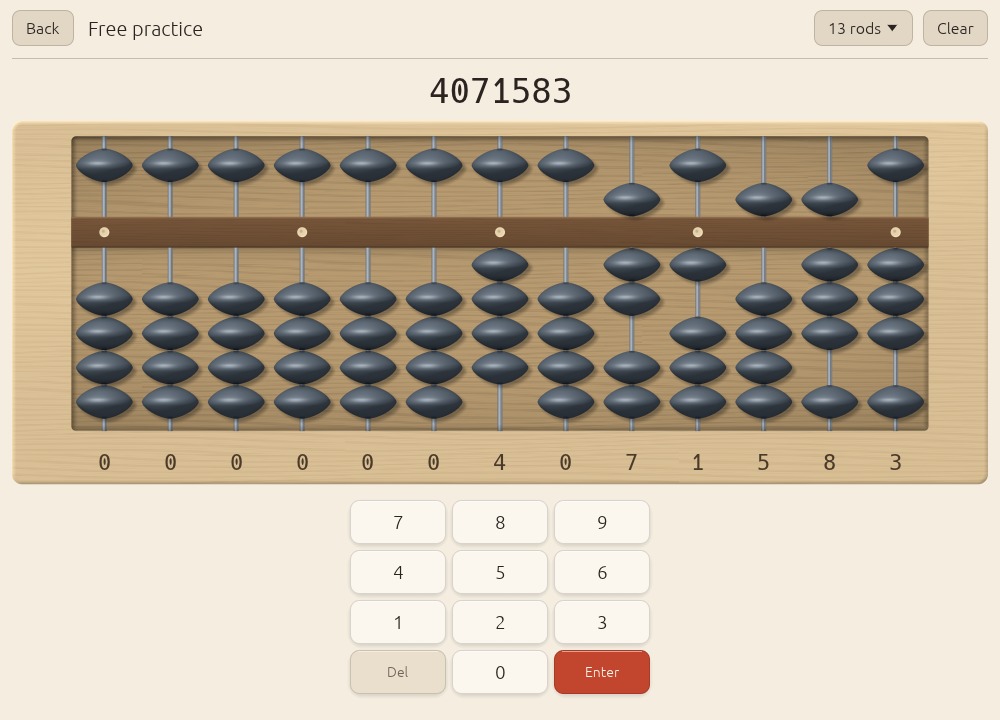
Finish (finish) | walnut, ebony, maple | walnut | The soroban’s material. Walnut: lacquered walnut frame, bamboo rods, bone beads. Ebony: near-black frame, brass rods and beam, bone beads. Maple: pale maple frame, steel rods, slate beads. Vermilion stays the one accent in all three. |
Large text (large_text) | on, off | off | Scales all text by 1.22. |
Reduce motion (reduce_motion) | on, off | off | Beads jump to their new place instead of gliding, and the hint halo stays steady instead of pulsing. |
Sound
| Setting | Choices | Default | What it does |
|---|---|---|---|
Bead click (sound) | on, off | off | A short synthesised click per bead group: a 2 ms noise burst into a decaying 1.8 kHz resonance, a little lower for the heaven bead. |
Volume (volume) | 0 to 1 | 0.6 | Loudness of the click. |
There is no sound on Android; the settings screen says so when there is no audio output.
Flash anzan
The three free-flash settings, digits (flash_digits, default 1), numbers
(flash_count, default 5) and seconds per number (flash_ms, default
1000 ms), are set on the flash screen itself before each run and remembered
there. See Anzan and flash anzan.
Data
- Profile shows the path of your save file.
- Save now writes it immediately (Abax also saves by itself within 5 seconds of a change, and when it closes).
- Reset all progress asks for confirmation, then deletes lesson progress, mastery and history. Your settings stay.
About
The Abax version, and the average and 95th-percentile frame time over the last 120 frames.
The save file
Settings, scheduler state and history are one JSON file, profile.json.
Where it is
| Platform | Directory |
|---|---|
| Linux | ~/.local/share/abax/ (or $XDG_DATA_HOME/abax/) |
| macOS | ~/Library/Application Support/abax/ |
| Windows | %APPDATA%\abax\data\ |
| Android | the app’s internal storage (not visible without root) |
Settings > Data shows the exact path. Set the environment variable
ABAX_DATA_DIR to use another directory on the desktop:
ABAX_DATA_DIR=~/abax-test abax # a separate, throwaway profile
To move your progress to another computer, copy profile.json into the same
place there while Abax is closed.
How it is written
Abax writes the whole document to profile.json.tmp, flushes it to disk
(fsync), and renames it over profile.json. The rename is atomic: the
file is either the old version or the new one.
If the file cannot be read (damaged, or written by a newer Abax), Abax
copies it to profile.json.bak, starts a fresh profile and logs a warning.
Versioning
The document carries a version field. This build writes version 1 and
reads versions up to 1; a missing or newer version is rejected. Two rules
let the format grow:
- Unknown fields are ignored, so an older Abax can open a file a newer one wrote, as long as the version number did not change.
- Missing fields take their defaults, so a newer Abax can open an older
file. The
finishsetting was added in 0.2.0; a 0.1.0 profile has no such field and loads as walnut. 0.3.0 addedmarked_knownto each skill andbuilds_on_notedat the top level; a 0.2 profile loads with every skill unmarked and no notes shown. Both changes are additive, so the version stays 1 and 0.2.x can still open a 0.3.0 file (it ignores the two fields).
When the curriculum gains a skill, loading fills in a fresh state for it.
When a change needs real conversion, the version number goes up and
SaveFile::migrate in crates/abax-core/src/store.rs gets a step for it.
The schema, annotated
The file is written on one line. Formatted and commented, after one answered item, with one of the fifteen skill entries:
{
  "version": 1,                       // format version
  "settings": {
    "rod_count": 13,                  // 9, 13, 17, 21, 23 or 27
    "theme": "System",                // "System" | "Light" | "Dark"
    "finish": "Walnut",               // "Walnut" | "Ebony" | "Maple" (0.2.0)
    "sound": false,
    "volume": 0.6,                    // 0..1
    "left_handed": false,
    "show_numbers": true,
    "show_keypad": true,
    "input_mode": "Both",             // "Tap" | "Drag" | "Both"
    "reduce_motion": false,
    "large_text": false,
    "hint_delay_seconds": 4.0,
    "flash_digits": 1,                // free flash anzan defaults
    "flash_count": 5,
    "flash_ms": 1000
  },
  "scheduler": {
    "skills": {                       // one entry per skill, keyed by name
      "Setting": {                    // S0; others: AddSimple, SubSimple, AddFive,
                                      // SubFive, AddTen, SubTen, Combined, MultiAdd,
                                      // MultiMixed, Multiply, Divide, Anzan,
                                      // FlashOne, FlashMulti
        "p_known": 0.4,               // BKT probability the skill is known
        "acc_ewma": 0.6,              // accuracy average
        "log_t_ewma": 1.8007,         // average ln(seconds per operand)
        "theta": 0.1824,              // Elo ability on this skill
        "n": 1,                       // answers so far
        "level": 0,                   // current ladder step, 0-based
        "last_practised": 1760000060, // unix seconds; 0 = never
        "mastered_at": null,          // unix seconds, or null
        "review_interval_days": 1.0,
        "consecutive_errors": 0,      // on the current step
        "items_at_level": 1,          // since the last step change
        "budget_seconds": 0.0,        // time budget per operand on a timed step
        "marked_known": false         // "I know this already" (0.3.0)
      }
    }
  },
  "history": {
    "attempts": [                     // oldest first, at most 50,000 kept
      {
        "ts": 1760000060,             // unix seconds
        "skill": "Setting",
        "level": 0,                   // ladder step the item came from
        "kind": "Set",                // Set | Read | AddSub | Multiply | Divide |
                                      // Mixed | Sprint | Anzan | Flash | Lesson
        "correct": true,
        "seconds": 2.4                // time for the whole item
      }
    ]
  },
  "created": 1760000000,              // unix seconds the profile was created
  "updated": 1760000060,              // unix seconds of the last save
  "builds_on_noted": []               // lessons whose "builds on" note was
                                      // shown once, e.g. ["Divide"] (0.3.0)
}
The scheduler chapter explains every field under
scheduler. Everything on the stats screen (momentum, mastery bars,
accuracy and speed curves, the session log) is computed from history when
it is shown; none of it is stored separately.
Building from source
Desktop
You need a stable Rust toolchain (install it with rustup). On Linux you also need the development headers for ALSA (sound) and for X11/Wayland windowing. On Debian or Ubuntu:
sudo apt-get install libasound2-dev libxkbcommon-dev libwayland-dev \
  libxcb-render0-dev libxcb-shape0-dev libxcb-xfixes0-dev
Windows and macOS need nothing beyond Rust (and the Xcode command-line tools on macOS).
git clone https://github.com/ZahakJ/abax
cd abax
cargo run --release -p abax
The release profile uses link-time optimisation, strips symbols and aborts on panic.
The release gate: ./verify
./verify
runs, in order, and stops at the first failure:
cargo fmt --all -- --check: formatting.cargo clippy --workspace --all-targets -- -D warnings: lints, with every warning an error.cargo test --workspace: all unit tests.cargo build --release -p abax: the desktop binary.
CI runs the same script on every push.
Android, without Gradle
Abax on Android is a pure native app: the manifest says hasCode="false"
and the activity is Android’s built-in NativeActivity, which loads
libabax.so and calls its android_main. android/build-apk.sh builds the
APK with the SDK’s command-line tools.
What you need
- The Android SDK with
build-tools;35.0.0andplatforms;android-35. - The NDK (CI uses 27.2.12479018).
- A JDK, for
apksignerandkeytool. cargo-ndkand the Rust Android targets:
cargo install cargo-ndk
rustup target add aarch64-linux-android armv7-linux-androideabi x86_64-linux-android
export ANDROID_HOME=/path/to/android-sdk
export ANDROID_NDK_HOME=$ANDROID_HOME/ndk/27.2.12479018
export JAVA_HOME=/path/to/jdk
Build
android/build-apk.sh --abis arm64-v8a --out dist/abax.apk
android/build-apk.sh --abis "arm64-v8a armeabi-v7a x86_64" --out dist/abax-universal.apk
Add --debug for an unoptimised build.
What the script does, step by step
- Native library.
cargo ndk -t <abi> … --platform 24 build -p abax --releasecompiles theabaxcrate aslibabax.sofor each ABI, against API level 24 (Android 7.0)..cargo/config.tomladds-z max-page-size=16384to the link, which Android 15 devices with 16 KB memory pages require. - Resources.
aapt2 compileturnsandroid/res/(icon, label, theme) into compiled resources;aapt2 linkcombines them withandroid/AndroidManifest.xmland the platform’sandroid.jarinto an unsigned APK. The version name comes from the workspaceCargo.tomland the version code is major × 10000 + minor × 100 + patch (0.3.0 is 300). - Libraries in. A few lines of Python add
lib/<abi>/libabax.soto the APK uncompressed, so Android can map them straight from the APK instead of extracting them. - Align.
zipalign -P 16 -f 4aligns the uncompressed libraries to 16 KB pages and everything else to 4 bytes. - Sign.
apksigner signsigns with APK signature schemes v2 and v3, thenapksigner verifyandaapt dump badgingprint what was built: the package,minSdkVersion 24,targetSdkVersion 35, the launchableandroid.app.NativeActivityand the native ABIs.
Pinned SDK components
The script uses fixed versions, not the newest in your SDK:
| Variable | Default | Selects |
|---|---|---|
ABAX_BUILD_TOOLS | 35.0.0 | $ANDROID_HOME/build-tools/<version> |
ABAX_PLATFORM | 35 | $ANDROID_HOME/platforms/android-<version>/android.jar |
It stops if either is missing.
Signing
Without ABAX_KEYSTORE the script signs with a throwaway debug key under
target/android/. Android refuses to update an app signed with a different
key, so a release needs a stable one:
| Variable | Meaning |
|---|---|
ABAX_KEYSTORE | path to the keystore |
ABAX_KEYSTORE_PASSWORD | its password (also used as the key password) |
ABAX_KEY_ALIAS | the key’s alias |
In the release workflow the keystore arrives base64-encoded in the
ABAX_KEYSTORE_B64 secret; the job fails without the three secrets.
Releases
Pushing a tag vX.Y.Z runs .github/workflows/release.yml: it builds Linux
(tarball with an installer), Windows (zip), macOS for Apple silicon and Intel
(dmg, cross-compiled on one Apple silicon runner) and both Android APKs,
writes SHA256SUMS.txt, and publishes a GitHub release whose text is the
tag’s section of CHANGELOG.md.
The website
The landing page and this manual are built by docs/build.sh and published
to GitHub Pages by .github/workflows/pages.yml on every push to main that
touches docs/. To build them locally you need
mdBook 0.5.4:
cargo install mdbook --version 0.5.4 --locked
docs/build.sh site-out
python3 -m http.server -d site-out 8000   # landing page at /, manual at /manual/
All links are relative, so the site works under any path.
Rendering
Everything except the soroban is ordinary egui:
text, buttons, the keypad, charts, hint arrows and the digits under the rods.
The soroban is one egui_wgpu paint callback: one pipeline, one instanced
draw, shaded per pixel in WGSL (crates/abax/src/render/mod.rs and
soroban.wgsl). eframe already renders through wgpu on every target; naga
translates the WGSL to Vulkan, Metal, DirectX 12 and OpenGL ES.

How it works
Every part of the instrument is one instance of a unit quad, drawn in this
order: the board, the recessed well, the glow behind the active rod, the
rods, the beam, the unit dots, an underline, hint halos, bead shadows, and
the beads. Each instance is 96 bytes: a rectangle, a kind, four parameters
and three colours. SorobanView::build_instances fills a reused Vec on the
CPU each frame; the callback’s prepare copies it into the instance buffer
and paint issues the single draw. Each soroban on screen (the home screen
has a small live one) owns its own instance and uniform buffers.
The fragment shader picks a shading function by kind:
- Beads are solids of revolution around the rod. The silhouette is a superellipse lens, pointed at the sides like a real biconical soroban bead, with the equator ridge slightly softened. From the profile the shader derives a surface normal, then lights it with a key light from the upper left: diffuse, a specular lobe, rim darkening at grazing angles, ambient occlusion where a bead touches its neighbour or the beam, and the dark bore where the rod enters. A short brightening marks a bead you just moved. For anzan the bead turns to glass: the body goes translucent first, the highlights last.
- Shadows are the lens silhouette, blurred, under each bead.
- Rods are thin cylinders: bamboo, brass or steel.
- The beam is bevelled lacquered wood with faint grain, or metal, with small inset pins for the unit dots.
- The board is grained wood with a lit and a shaded bevel, rounded corners and a soft diagonal sheen; the well inside it is darker, with an inner shadow cast by the frame and a vignette.
The shader works in linear light and encodes at the end for whichever target format egui uses, with premultiplied alpha, so its output blends exactly like egui’s own meshes.
Finishes
| Finish | Frame | Rods and beam | Beads |
|---|---|---|---|
| Walnut (default) | lacquered walnut, warm grain | bamboo | bone |
| Ebony | near-black ebony, fine grain | brass | bone |
| Maple | pale maple, fine grain | steel | slate |
Each has a light and a dark variant.
Fallback
Without a wgpu render state, Abax logs a warning and draws the soroban with plain egui shapes.
Benchmarks
ABAX_BENCH=frames=400 ABAX_WINDOW=1200x800 ./target/release/abax
ABAX_BENCH=frames=N prints one line after N frames, leaving out the first
10:
ABAX_BENCH frames=390 rods=27 ui-pass avg/p95=… ms cpu-frame avg/p95=… ms frame period avg/p95=… ms
ABAX_BENCH=start prints the time from the top of App::new to the first
frame. Both measure CPU time only.
Screenshot and capture modes
Captures come from the app itself, driven by environment variables (desktop only).
| Variable | Effect |
|---|---|
ABAX_WINDOW=WxH | Window size in points, for example 1000x720 or 420x820. |
ABAX_SHOT=<screen>:<file.png> | Open <screen>, wait 40 frames, save a PNG, exit. The window is fixed-size and undecorated, so tiling window managers float it. |
ABAX_SHOT=<screen>:<dir>/ | Sequence mode (the path ends in /): record 48 consecutive frames as frame-000.png … frame-047.png while the practice soroban runs a scripted set of moves. |
ABAX_DEMO_DATA=1 | Fill the history and scheduler with two weeks of sample practice. |
ABAX_DATA_DIR=<dir> | Use the profile in <dir>; this is how a capture picks its theme and finish. |
ABAX_BENCH=start or frames=N | The benchmarks above. |
Screens for ABAX_SHOT: home, practice (4071583 on the beads), glass
(the same, part-way through the anzan fade), lesson (lesson S3),
lesson-gap (lesson S11, opened ahead of its prerequisite), drill
(an S5 drill), stats, lessons, flash (the flash anzan setup),
flash-run (a number mid-flash), settings. Anything else opens home.
ABAX_DEMO_DATA changes the profile it runs with; pair it with a throwaway
ABAX_DATA_DIR. A capture in the dark theme with the ebony finish:
mkdir -p /tmp/abax-shot
echo '{"version":1,"settings":{"theme":"Dark","finish":"Ebony","rod_count":13}}' \
  > /tmp/abax-shot/profile.json
ABAX_DATA_DIR=/tmp/abax-shot ABAX_DEMO_DATA=1 ABAX_WINDOW=1000x720 \
  ABAX_SHOT=practice:practice-ebony-dark.png ./target/release/abax
The landing page’s hero loop is a sequence (empty, 4071583, 2958, 7310246), 48 frames cropped to the soroban at 20 frames per second:
mkdir -p shot/profile shot/frames
ABAX_DATA_DIR=shot/profile ABAX_WINDOW=1000x720 \
  ABAX_SHOT=practice:$PWD/shot/frames/ ./target/release/abax
# crop to the soroban, then encode the two formats the landing page uses
ffmpeg -framerate 20 -i shot/frames/frame-%03d.png -vf crop=976:370:12:118 \
  -pix_fmt yuv420p -c:v libx264 -crf 20 -movflags +faststart hero.mp4
ffmpeg -framerate 20 -i shot/frames/frame-%03d.png -vf crop=976:370:12:118 \
  -pix_fmt yuv420p -c:v libvpx-vp9 -b:v 0 -crf 30 -an hero.webm
Architecture for contributors
Two crates
crates/abax-core/     pure logic: no UI, no I/O, no randomness of its own
  soroban.rs          rods and the soroban: beads <-> digits <-> numbers
  moves.rs            the bead-move engine: the exact move list for adding or
                      subtracting a digit (complements, carry, borrow, finger order)
  arith.rs            multi-digit add/sub; multiplication and division as
                      narrated step sequences (Kojima's standard methods)
  curriculum.rs       the 15 skills, prerequisites, ladders, lesson text and demos
  generator.rs        drill items per skill and ladder step
  scheduler.rs        BKT, EWMAs, Elo, ladder rules, mastery, review, session plan
  stats.rs            history, momentum, chart series, session log
  store.rs            the versioned save document and its migration
crates/abax/          the eframe app: a binary on the desktop, a cdylib on Android
  lib.rs              App: screens, settings, autosave, capture and bench modes,
                      android_main
  main.rs             desktop entry point (window size, bench options)
  soroban_view.rs     the interactive soroban: hit testing, tap and drag,
                      spring animation, hints, building render instances
  render/             the wgpu paint callback (mod.rs) and its shader (soroban.wgsl)
  screens/            home, practice, lesson, drill, flash, picker, stats, settings
  keypad.rs           on-screen keypad and keyboard mapping
  theme.rs, ui.rs     palette, finishes, fonts; shared widgets
  charts.rs           the stats charts
  audio.rs            the synthesised click (desktop, cpal)
  storage.rs          data directory, atomic save, load with backup
android/              manifest, resources, build-apk.sh
packaging/            .desktop file, icon, install.sh, Info.plist, make-app.sh
docs/                 this manual, the landing page, the screenshots
research/             sources and the bead-move fixture tables
verify                the release gate
abax-core holds the rules and most of the tests. Randomness comes from
the caller: generators take a dice closure, the scheduler a seeded
xorshift generator.
Data flow
- Input. A tap, drag or key goes to
SorobanView, which updates itsSorobanmodel and animates the beads towards it. - Checking. The active screen compares the model with the current
Item(fromgenerator::generate). Chain items follow the running total operand by operand; typed items compare the keypad buffer. - Recording.
DrillState::submitcallsScheduler::record(skill, correct, seconds, now), which updates that skill’s state and returns whether it stepped up, stepped down or became mastered, and appends anAttempttoHistory. - Saving. The app marks itself dirty; within 5 seconds, and on exit,
storage::savewrites the wholeSaveFileatomically. - Planning. The home screen asks
Scheduler::next_skill_to_learnfor an untried lesson, otherwiseScheduler::plan_sessionfor warm-up, focus and cool-down drills.
Adding a skill
curriculum.rs: add aSkillIdvariant in teaching order and toSkillId::ALL; give it acode,name,short_name,prerequisites,base_difficulty,benchmark_secondsand aladder; add itsLessontoLESSONS.generator.rs: generate its items ingenerate, and if it is a bead skill, give it aConstraintinconstraint_forsaying which rules it allows and which it must contain.- The app:
drill_kind_forinscreens/drill.rs, the groups inscreens/picker.rs, and the session start inApp::start_pending_orif it needs a special mode. - Tests already guard the shape: prerequisites must form a graph in teaching order with one root, and every skill needs a lesson and a ladder of at least three steps that starts untimed.
Old save files keep loading: Scheduler::fill_missing gives a new skill a
fresh state. Do not rename existing variants: their names are the keys in
the save file.
Adding a drill type
generator.rs: anItemvariant, withanswer,prompt,operand_countandsolution_steps(the moves a wrong-answer replay shows).stats.rs: aDrillKindvariant, if the stats should tell it apart. Append it; variant names are stored.screens/drill.rs: how the item is set up on the soroban (setup_item), whether the answer is typed or worked on the beads (typed_answer), how many rods it needs (rods_needed) and what the replay shows (replay_steps_for).
Tests
The tests include:
- the complete 10 × 9 addition and 10 × 9 subtraction tables from the research notes: for every digit on the rod and every digit added or subtracted, the exact move list, rule and order;
- worked multiplication and division examples from Kojima, including division with revised quotient digits;
- generators: every item for a skill uses that skill’s rule and nothing beyond it;
- the scheduler: the BKT sequence, the EWMA sequences, U(n), Elo monotonicity, the mastery gate rejecting four lucky answers and slow answers, forgetting and the session planner choosing only skills on the suggested path or already met, adding a light review when a prerequisite is weak, and never failing on any mix of known, practised and skipped skills; “I know this” seeding 0.80 (not 1.0) and the per-skill reset;
- save files: round trip, unknown fields ignored, missing fields defaulted, bad input an error rather than a crash; atomic write and backup on a damaged file.
Run them with cargo test --workspace, or the whole gate with ./verify.
Bead-move changes must keep the full tables green.
Conventions
- Clippy warnings are errors;
cargo fmtdecides formatting. - Western digits (0 to 9) in every string.
- Palette, motion and interaction:
docs/internals.md. - Captures live only in
docs/screenshots/.
See CONTRIBUTING.md
for how to propose a change.
Changelog
Unreleased
0.3.0 - 2026-10-11
Changed
- Nothing is locked. Every lesson opens at any time from the lesson list, every skill can be picked in Drills and Sprint, and the stats bars show “new” instead of “locked”. Prerequisites are now recommendations: the list marks the suggested next lesson (“next”), Home’s Continue opens it, and a lesson whose prerequisites are not yet at 0.80 shows a small “Builds on: …” line with a link to each of them. The note appears once per lesson and never blocks.
- The session planner chooses from skills on the suggested path plus every skill already practised or marked known, in any order. A focus skill with a weak prerequisite still runs; when no review is due, the warm-up becomes a light review of that prerequisite (5 untimed items).
Added
- “I know this already” at the top of every lesson. It marks the skill as known, sets its knowledge estimate to 0.80 (the threshold, not 1.0, and never lower than an estimate already earned) and moves on to the suggested next lesson. Known skills are mixed into focus drills and cool-downs.
- “Reset this skill” on a lesson marked known, and Settings > Data > Reset one skill for any skill. A skill with real practice asks for a second tap. History is kept.
- Capture screen
lesson-gap(lesson S11 opened ahead of its prerequisite) forABAX_SHOT; the demo profile marks A1 as known.
Save file
- Two additive fields:
marked_knownon each skill andbuilds_on_notedat the top level. 0.2 profiles load unchanged; the format version stays 1, so 0.2.x can still open a 0.3.0 profile. - Android versionCode 300.
0.2.1 - 2026-10-12
Fixed
- macOS: the app opened as “Abax is damaged and can’t be opened”.
make-app.shnow ad-hoc signs the finishedAbax.app(codesign --force --deep --sign -), the release job signs the dmg too, and the job fails unlesscodesign --verify --deep --strictpasses on the.appand on the copy inside the dmg. The app is still not notarized: the first launch needs right-click > Open (macOS 15 and later: Privacy & Security > Open Anyway) orxattr -cr /Applications/Abax.app. Seedocs/macos-gatekeeper.md. - Android versionCode 201.
0.2.0 - 2026-10-11
Rendering
- The soroban is drawn by one wgpu paint callback: one pipeline, one instanced draw, shaded per pixel in WGSL. Beads are solids of revolution with a key light, specular highlight, rim darkening, contact occlusion and soft shadows; rods are shaded cylinders; the beam is bevelled lacquer with inset unit dots; the frame is grained, bevelled wood around a vignetted well.
- Three finishes under Settings > Appearance, each tuned for light and dark: Walnut (bone beads, bamboo rods, the default), Ebony (bone beads, brass rods and beam) and Maple (slate beads, steel rods). Saves from 0.1.0 load as Walnut.
- The anzan fade turns beads to glass: the body goes first, the highlights last.
- The previous egui painter remains as a fallback when wgpu is unavailable.
Interface
- Hints: a stronger vermilion halo and an outlined arrow with a shaft.
- Bead moves settle on a critically damped spring; beads you move brighten briefly.
- Flash anzan shows large numerals; the home screen carries a small live soroban.
- Shared header, card, section and button styles across all screens.
Docs and site
- A manual (mdBook) and a landing page with downloads for the latest release, published on GitHub Pages at https://zahakj.github.io/abax/.
- New captures of every screen in light and dark, the three finishes, and a looping hero clip.
- Screenshot mode can record a frame sequence (
ABAX_SHOT=<screen>:<dir>/) and hasglassandflash-runtargets. - Contributing guide, code of conduct, security policy, issue and pull request templates.
Build and release
- The Android build pins build-tools 35.0.0 and platform 35 (
ABAX_BUILD_TOOLS,ABAX_PLATFORM). - Release notes are this file’s section for the tag.
- The APK carries the workspace version: 0.2.0 is versionCode 200 and installs over 0.1.0 (versionCode 1).
- A Pages workflow builds the site with a pinned mdBook 0.5.4.
0.1.0 - 2026-10-10
First release.
- Soroban model and bead-move engine with every five- and ten-complement rule, carry and borrow, and Kojima’s finger-order rules; multiplication and division as step sequences.
- Curriculum of 15 skills (S0-S11, A1-A3) with lessons (explanation, demonstration, guided practice), drills (set, read, chains, multiplication, division, mixed, 60 s sprint), anzan with fading beads and flash anzan.
- Adaptive scheduler: Bayesian Knowledge Tracing per skill, accuracy and speed EWMAs, Elo-style item difficulty, mastery gate, session planner (warm-up, focus, cool-down), 14-day momentum instead of streaks.
- egui/eframe app on wgpu: interactive soroban (tap, drag, keyboard), on-screen keypad, light and dark themes, stats charts, settings, synthesised bead click on desktop.
- Versioned JSON profile written atomically.
- Binaries for Linux, Windows and macOS; Android APKs (arm64 and universal) built without Gradle.
Roadmap
- Sound on Android, through AAudio and the
ndkcrate. - Signed desktop builds: a notarized macOS app and a signed Windows binary.
- More multiplication and division: decimals and Kojima’s rules for placing the point, longer multipliers and divisors, head-first methods.
- Translations. Interface and lesson text live in
curriculum.rsand the screens. - Dictated numbers (yomiage-zan).
- A placement probe. The scheduler supports placing a learner from a short mixed test; there is no screen for it yet.
- Faster flash steps. The ladders stop at 0.4 s per number for one digit and 0.5 s for three.
Suggestions go in GitHub issues.